
create a branch
git checkout -b api_0_4_4
switch to a branch
git fetch && git checkout api_0_4_4
merge a branch
git checkout master
git pull origin master
git merge api_0_4_4
git push origin master
git checkout -b api_0_4_4
git fetch && git checkout api_0_4_4
git checkout master
git pull origin master
git merge api_0_4_4
git push origin master
 A new article at the New Republic caught my eye this morning. It is about Facebook (and other social media) click-farming.
I encourage everyone to read the entire article. Yes, it will require some time and attention, but I found it very informative.
For those without the time, or inclination to read it, here are some of my takeaways:
A very good read on scalability and high-performance data management.
Over the last 10 years I’ve used all but Mongo and Redis to solve these very same issues, and had the same Findings.
A couple of the surprising lessons to me was how bad Cassandra was, and how good Solr is.
I hope you find this as interesting as I did:
When I heard about a UPI report that the US Carrier George Washington has been attacked by a Chinese war ship, and was damaged, it smelled fishy so I started poking around the interwebs.
New York Post, UPI Twitter accounts hacked
UPI website, Twitter account hacked
Press International’s website and Twitter account were hacked Friday afternoon, with someone attempting to publish false stories.
It started on Twitter, where six fake headlines were posted in about 10 minutes, starting about 1:20 p.m. Some of them were about the Federal Reserve; others contained a false report that the USS George Washington had been attacked.
Pope declares WWWIII?
Twitter accounts for NY Post, UPI hacked to push fake WWIII alerts

I was actually alerted to this by the NAVY Times post that the carrier was not attacked and actually safely in port!

Navy: China has not attacked U.S. aircraft carrier
The aircraft carrier George Washington has not been attacked, and World War III has not begun, despite what tweets from United Press International say, the Navy has confirmed.
The carrier is in port, not in the South China Sea, the Navy told Military Times on Friday.
Using single vs. double quotes when handling strings in PHP (and code in general). This article is a re-hash of experimentation done about 6 years ago with PERL. It was very clear that unless you have a VERY compelling reason to use double-quotes with strings.. you shouldn’t do it.
Some people will ask.. “Why, what’s the diff”? Well, simply put.. double quoted string are more work for interpreted code languages such as PERL and PHP (and possibly others too, but I’ve never tested them). Compiles languages should not be subject to such unfortunate circumstance.
Using double quotes vs. single quotes in string copies or setting will cost you and extra processing time (proofs follow).
However, when it comes to variable substitutions, that’s where you’ll see more of the speed benefit, when not forcing PHP to interpret the string looking for variables to substitute.
Although, one interested finding after multiple test runs was that bounding the variable with brackets does not offer a consistent benefit, and often it’s a slight loss of speed.
Here is the raw comparison of the following string copies (heavily iterated):
$x = “THIS IS A STRING” 1.336
$x = ‘THIS IS A STRING’ 1.187
$x = “THIS IS A STRING $i” 3.004
$x = “THIS IS A STRING ${i}” 3.015
$x = “THIS IS A ${i} STRING” 3.448
$x = ‘THIS IS A STRING’.$i 2.647
$x = ‘THIS IS A ‘.$i.’ STRING’ 3.488
 Interesting read about possibly looming troubles for Google. I will say that in the past I used Google to look for products, but most of the items I found that way were from shaky looking distributors, or links to Amazon, where I found they had a very competitive price.
Perception is reality, my personal perception is that Amazon is a trustworthy enough for me to buy from them. Over the last few months I’ve simply quit Googling for products and checked Amazon first, and only using Google if I felt that Amazon didn’t offer the product or the price was more than I wanted to pay.
Google’s stocks have taken a dive recently. It was a rocky 2014 but the last month has seen a nose dive in stock trading value:

That’s not all. As the Mercury News (headquartered in Silicon Valley) reported last month, FireFox has dropped Google as it’s default search engine:
http://www.mercurynews.com/business/ci_26971412/firefox-drops-google-yahoo-default-search-engine
Here is a link to an opinion piece on LinkedIn that discusses this further:
https://www.linkedin.com/pulse/googles-very-rough-transition-nicholas
While watching the sky fall here on the California Coast, I decided to hack together a fun little toy for scouring some of the local Craigs List sites for things; such as Track Bikes. 🙂
Using a multi-dimetional array of States, with sub-regions, hostnames were collected recorded. It looks something like this:
/*  Craigs List Stores */
$CLStores = array(
	'California' => array(
		'San Francisco' => 'http://sfbay.craigslist.org',
		'Chico' => 'http://chico.craigslist.org',
		'Sacramento' => 'http://sacramento.craigslist.org',
...
		),
	'Nevada' => array(
		'Reno' => 'http://reno.craigslist.org',
		'Elko' => 'http://elko.craigslist.org',
...
		),
...
This list is iterated upon, with each entry being passed to and AJAX worker bot. When the bot completed the page grab and parsing, the data is returned to the main document, and dynamically inserted.
foreach($CLStores as $state => $center){
        printf('
%s ',$state); ... printf('
- ',$url,$state,$name,$id); ...
%sLoading...
This is all pretty basic stuff, but automation of searches is a specialty of mine, and it’s kept me gainfully employed with many contracts over the last 15 years.
Here is THE TRACK BIKE SEARCH LINK
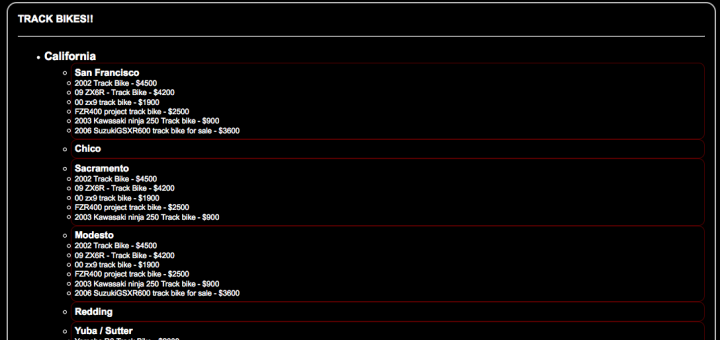
Final results look like this:
Originally posted June 2013
Being on the Apple Developers list, I’ve installed the latest edition of the OS and am doing some Beta testing of my apps.
A few days after upgrading, my Gearman test code stopped working with this error:
Fatal error: Class ‘GearmanClient’ not found in connect.class.php on line 35
That triggered a slight bit of panic, however I knew my libraries were mostly in tact as I was able to start my gearmand service without a problem at all. Hoping against odds I decided to simply run a new make and install of the Gearman PHP components.
UPDATE: If you do not have the latest Gearman libraries for PHP, they are located here: http://pecl.php.net/package/gearman I recommend you download the latest version and build from that.. My page on building PHP Gearman on OSX is located [HERE]
I cd’d to the directory where I’d built my Gearman PHP libraries a few days prior:
david$ cd /usr/local/gearman-1.1.2
NOTE: If you have not recently built PHP Gearman modules, this page [ HERE ] detailed getting to the next step.
Then I ran a make and a make install in the directory.
gearman-1.1.1 david$ make
/bin/sh /usr/local/gearman-1.1.2/libtool –mode=install cp ./gearman.la /usr/local/gearman-1.1.2/modules
cp ./.libs/gearman.so /usr/local/gearman-1.1.2/modules/gearman.so
cp ./.libs/gearman.lai /usr/local/gearman-1.1.2/modules/gearman.la
[…]
Build complete.
Don’t forget to run ‘make test’.gearman-1.1.1 david$ sudo make install
/bin/sh /usr/local/gearman-1.1.2/libtool –mode=install cp ./gearman.la /usr/local/gearman-1.1.2/modules
cp ./.libs/gearman.so /usr/local/gearman-1.1.2/modules/gearman.so
cp ./.libs/gearman.lai /usr/local/gearman-1.1.2/modules/gearman.la
———————————————————————-
Libraries have been installed in:
/usr/local/gearman-1.1.2/modules[…]
———————————————————————-
Installing shared extensions: /usr/lib/php/extensions/no-debug-non-zts-20090626/
This worked perfectly, and following a RE-CREATION of my /etc/php.ini file (which I also lost), I was good to go!
include_path=.:/mnt/crawler
extension=”gearman.so”
Viola.. Gearman development back underway!!

The Gearman.org page has links to the PHP code on the Downloads page, however the link is very old. The latest code is located at: http://pecl.php.net/package/gearman.
As of 23-OCT-2014, the current stable version is gearman-1.1.2.
I like to drop these files in my /opt directory, and work on them there and unball the package.
mv ~/Downloads/gearman-1.1.2.tgz /opt/.
tar xvzf gearman-1.0.2.tgz
cd gearman-1.0.2
The following commands prepared the PHP package to build on OSX Yosemite (10.10).
phpize
Configuring for:
PHP Api Version: 20121113
Zend Module Api No: 20121212
Zend Extension Api No: 220121212./configure
checking for grep that handles long lines and -e… /usr/bin/grep
checking for egrep… /usr/bin/grep -E
checking for a sed that does not truncate output… /usr/bin/sed
[…]
appending configuration tag “CXX” to libtool
configure: creating ./config.status
config.status: creating config.h
Next step is to run the compile and install the built objects:
make
/bin/sh /opt/gearman-1.1.2/libtool –mode=compile cc -I. -I/opt/gearman-1.1.2 -DPHP_ATOM_INC -I/opt/gearman-1.1.2/include -I/opt/gearman-1.1.2/main -I/opt/gearman-1.1.2 -I/usr/include/php -I/usr/include/php/main -I/usr/include/php/TSRM -I/usr/include/php/Zend -I/usr/include/php/ext -I/usr/include/php/ext/date/lib -I/usr/local/include -I/usr/local/include -DHAVE_CONFIG_H -g -O2 -Wall -c /opt/gearman-1.1.2/php_gearman.c -o php_gearman.lo
mkdir .libs
[…]
Build complete.
Don’t forget to run ‘make test’.make install
Installing shared extensions: /usr/lib/php/extensions/no-debug-non-zts-20121212/
You will need to identify your relevant php.ini file, and edit it, letting PHP know where the library file are located.
Typically under OSX, this file does not exist, and it must be created.
Edit the file:
vi /etc/php.ini
Either way, make sure these two lines are in the file:
Add these lines:
include_path=.:/mnt/crawler
extension=gearman.so
At this point you should be able to reference Gearman library in your PHP code.
These lines of code, should not throw an error:
$client = new GearmanClient(); // instance
$worker = new GearmanWorker(); // instance
Why.. why? Just because it’s useful when pages had dynamic content in javascript. Is there a way to subsequently evaluate the javascript parsed.. that’s for another article, but for now, I’m going to assume you have node.js installed, and you have at least come idea of how to use it.
Finding all the <script> nodes in an HTML page, rendered using
‘request.get()’
.
In the example, url (in this case www.amazon.com) is resolved and the HTML loaded. The loaded HTML is then passed to cheerio using this expression:
var $ = cheerio.load(html,{ normalizeWhitespace: false, xmlMode: false, decodeEntities: true });
.. then iterated upon using the .each( ..) object method.
$(‘script’).each( function () {…
In the very simple example the follows the script is logged to the console (STDOUT) for display. In an more advanced and useful implementation, the returned javascript would be interacted with, parsed or some other action taken.
// MAKE REQUIREMENTS
var request = require(‘request’);
var cheerio = require(‘cheerio’);// Local Vars
var url = ‘https://www.amazon.com’;// Define the requests default params
var request = request.defaults({
jar: true,
headers: { ‘User-Agent’: ‘Mozilla/5.0 (Macintosh; Intel Mac OS X 10.8; rv:24.0) Gecko/20100101 Firefox/24.0’ },
})// execute request and parse all the javascript blocks
request(formUrl, function (error, response, html) {
if (!error && response.statusCode == 200) {// load the html into cheerio
var $ = cheerio.load(html,{ normalizeWhitespace: false, xmlMode: false, decodeEntities: true });// iterate on all of the JS blocks in the page
$(‘script’).each( function () {
console.log(‘JS: %s’,$(this).text());
});
}
else {
console.log(‘ERR: %j\t%j’,error,response.statusCode);
}
});