Setting up a Java build env to prepare for Cassandra development

Getting it all ready…
PREV: Cassandra and Big Data – building a single-node “cluster”

First, I wanted to see how much of a system footprint 3 instances of Cassandra had on this little system. Here you can see the 3 instances patiently waiting for something todo. Sitting idle for about 24 hours (note, TIME+ is system time, not wall clock), total memory utilization has crept up from 11% to 14% per process.


PID USER PR NI VIRT RES SHR S %CPU %MEM TIME+ COMMAND
4554 bigdata 20 0 891m 134m 4388 S 7.6 14.4 7:47.96 java
4632 bigdata 20 0 917m 133m 4340 S 0.7 14.3 7:45.64 java
4593 bigdata 20 0 896m 133m 4168 S 0.3 14.3 7:40.37 java

Keep in mind this test box has a single core CPU with a whopping 1GB of memory. If I can get it to work on this box without pushing it over, you should be able to run a single instance on any box with a reasonable expectation of function.

The data model I wanted to use is pretty basic: IP traffic, consisting of the following elements:

* IPv4 address
* destination port
* timestamp
* TTL (this is a Cassandra construct to allow auto-tombstoning of data when it’s usefulness has expired)

To get this data, I’m thinking of simply running TCPdump on a box, or possibly my laptop, to generate some traffic, then stream that into a program to insert into Cassandra as fast as the packets go by.

With the limited disk space on the box (see below) I can’t run it indefinitely, but I should be able to run it for an afternoon to load a keyspace, then start to figure out how to get the data back out!


Filesystem 1K-blocks Used Available Use% Mounted on
/dev/sda1 75956320 4344788 67753152 7% /
none 470324 640 469684 1% /dev
none 478024 420 477604 1% /dev/shm
none 478024 108 477916 1% /var/run
none 478024 0 478024 0% /var/lock

One thing I could do is load the data into the database, then run a 2nd pass processor on it and mutate the data with reverse lookups. Sort of a poor-man’s Wireshark type of tool. Now, if I wire this into my eventually to be setup RPZ enabled DNS resolver, I could track all data on my network, including all the requests from my Apple TV device. It might be interesting to see what it’s *really* doing on the network.


Downloading Support Packages for Development Environment

Before staring to code though, it looks like I need to ensure my JDK / Java libs are all up to date… and also to facilitate working with the documentation I’m reviewing.. Apache ANT will be installed too.

Java JDK – Java Software Development Kit

The JDK is a development environment for building applications, applets, and components using the Java programming language.
The JDK includes tools useful for developing and testing programs written in the Java programming language and running on the Java&™; platform.

Package URL: http://download.oracle.com/otn-pub/java/jdk/7u3-b04/jdk-7u3-linux-x64.tar.gz


mkdir jdk
cd jdk
wget http://download.oracle.com/otn-pub/java/jdk/7u3-b04/jdk-7u3-linux-x64.tar.gz

Extract the package:

tar xvzf jdk-7u3-linux-x64.tar.gz

Although I could simply run the JDK from the local user location, I decided to go for the ‘System Install’ option, and created a jdk location in user/lib, then copied the parts there according to the info in the docs. In this case I just downloaded the JRE again… you could skip that step and copy the .gz file already downloaded above. Your call.


sudo mkdir /usr/lib/jdk
cd /usr/lib/jdk
sudo wget http://download.oracle.com/otn-pub/java/jdk/7u3-b04/jdk-7u3-linux-x64.tar.gz
sudo tar xvzf jdk-7u3-linux-x64.tar.gz
sudo rm jdk-7u3-linux-x64.tar.gz

Oracle’s page says that it’s now ‘installed’ but I suspect there are a more than a few more steps required here! This is almost as good as Oracle technical support… I’ll try to be a little more helpful.

Setting the path in my ~/.bash_profile will resolve the path issue for Ant and JUnit. This is what I set in my file:

export JAVA_HOME=/usr/lib/jdk/jdk1.7.0_03

ANT – Apache Ant

Apache Ant is a Java library and command-line tool whose mission is to drive processes described in build files as targets and extension points dependent upon each other. The main known usage of Ant is the build of Java applications. Ant supplies a number of built-in tasks allowing to compile, assemble, test and run Java applications. Ant can also be used effectively to build non Java applications, for instance C or C++ applications. More generally, Ant can be used to pilot any type of process which can be described in terms of targets and tasks.

Package URL: http://www.carfab.com/apachesoftware//ant/binaries/apache-ant-1.8.3-bin.tar.gz


mkdir ant
cd ant
wget http://www.carfab.com/apachesoftware//ant/binaries/apache-ant-1.8.3-bin.tar.gz

Extract the package:


tar xvzf apache-ant-1.8.3-bin.tar.gz

Docs inside Ant say to go back to the web and read the installation instructions, located here: http://ant.apache.org/manual/install.html#installing I happen to like where my ant stuff was installed so I’m going to set ANT_HOME in my ~/.bash_profile to the location where I extracted the stuff. Ideal? Probably not but I’m doing this research on a perfectly good Saturday.. you get what you’re paying for.


export ANT_HOME=/home/bigdata/ant/apache-ant-1.8.3
export PATH=$PATH:$ANT_HOME/bin

Testing to see if the paths and parts are there worked. This error is actually expected (we’ll write the build.xml later).

$ ant
Buildfile: build.xml does not exist!
Build failed

JUnit – Test framework for test based development

JUnit is a simple framework to write repeatable tests. It is an instance of the xUnit architecture for unit testing frameworks.


mkdir junit
cd junit
wget https://github.com/downloads/KentBeck/junit/junit-4.10.jar
wget https://github.com/downloads/KentBeck/junit/junit4.10.zip

Extract the source package, in case I need it:


unzip junit4.10.zip

I can’t say this is the best way to do this, it’s cookie-cutter implementation from documentation. If you see something that does not make sense or is flat out stupid, post comment and let me know!


Development Environment Setup

Create primary development folder and expected sub-folders. You’re naming conventions may vary:


mkdir cBuild
mkdir cBuild/src
mkdir cBuild/src/{java,test}
mkdir cBuild/lib

Populate the lib with libraries from the Cassandra distribution and Junit.


cp cassA-1.0.8/lib/*.jar cBuild/lib/.
cp junit/*.jar cBuild/lib/.

To employ JUnit testing harness via Ant Java builder, a build.xml file is required in the cBuild base directory. Here are sample contents. You’re paths may differ if you went your own way on the directories.

vi cBuild/build.xml

<project name="jCas" default="dist" basedir=".">
  <property name="src" location="src/java"/>
  <property name="test.src" location="src/test"/>
  <property name="build" location="build"/>
  <property name="build.classes" location="build/classes"/>
  <property name="test.build" location="build/test"/>
  <property name="dist" location="dist"/>
  <property name="lib" location="lib"/>
  <!-- Tags used by Ant to help build paths, most useful when multiple .jar files are required --> 
  <path id="jCas.classpath">
    <pathelement location="${build.classes}"/>
    <fileset dir="${lib}" includes="*.jar"/>
  </path>
  <!-- exclude test cases from the final .jar file, this defines that policy -->
  <path id="jCas.test.classpath">
     <pathelement location="${test.build}"/>
     <path refid="jCas.classpath"/>
  </path>
  <!-- Define the 'init' target, used by other build phases -->
  <target name="init">
    <mkdir dir="${build}"/>
    <mkdir dir="${build.classes}"/>
    <mkdir dir="${test.build}"/>
  </target>
  <!-- 'compile' target -->
  <target name="compile" depends="init">
    <javac srcdir="${src}" destdir="${build.classes}">
       <classpath refid="jCas.classpath"/>
    </javac>
  </target>
  <!-- 'test compile' target -->
  <target name="compile-test" depends="init">
    <javac srcdir="${test.src}" destdir="${test.build}">
      <classpath refid="jCas.test.classpath"/>
    </javac>
  </target>
  <!-- setup policies that tell JUnit to execute tests on files in test that end with .class -->
  <target name="test" depends="compile-test,compile">
    <junit printsummary="yes" showoutput="true">
      <classpath refid="jCas.test.classpath"/>
      <batchtest>
        <fileset dir="${test.build}" includes="**/Test.class"/>
      </batchtest>
    </junit>
  </target>
  <!-- on a good build, dist target creates final JAR  jCas.tar -->
  <target name="dist" depends="compile">
    <mkdir dir="${dist}/lib"/>
    <jar jarfile="${dist}/lib/jCas.jar" basedir="${build.classes}"/>
  </target>
  <!-- run target allows execution of the built classes -->
  <target name="run" depends="dist">
    <java classname="${classToRun}">
      <classpath refid="jCas.classpath"/>
    </java>
  </target>
  <!-- clean target gets rid of all the left over files from builds -->
  <target name="clean">
    <delete dir="${build}"/>
    <delete dir="${dist}"/>
  </target>
</project>

NOTE!. There is a bug in Ant 1.8 that requires the addition of this element, or you will be plagued with nasty warnings:

...

This is the proper way to modify that above two javac blocks to include these element:

<javac srcdir="${src}" destdir="${build.classes} includeantruntime="false"">
<javac srcdir="${test.src}" destdir="${test.build}" includeantruntime="false">

Testing this build environment
Having created the build.xml file, it needs to be tested to make sure it even works.

Create a test case and build case

cd cBuild/src
vi Test.java

import junit.framework.*;
public class Test extends TestCase {
  public void test() {
    assertEquals( "Equality Test", 0, 0);
  }
}

Create a really simple program..

vi X1.java

public class X1 {
  public static void main (String [] args) {
    System.out.println("This is Java.... drink up!");
  }
}

Now the rubber meets the road if everything is setup properly and we can build a file!

Run ant with target set to 'test'

~/cBuild$ ant test
Buildfile: /home/bigdata/cBuild/build.xml

init:

compile-test:

compile:
[javac] Compiling 1 source file to /home/bigdata/cBuild/build/classes

test:

BUILD SUCCESSFUL
Total time: 7 seconds

Run ant with target set to 'diet'

~/cBuild$ ~/cBuild$ ant dist
Buildfile: /home/bigdata/cBuild/build.xml

init:

compile:

dist:
[jar] Building jar: /home/bigdata/cBuild/dist/lib/jCas.jar

BUILD SUCCESSFUL
Total time: 1 second

It's a good idea to check your .jar to make sure your class is actually in it. Ant, for some reason beyond understanding or logic, WON'T let you know if your lib was skipped (had it happen in my first build.. exceptionally ungood).


~/cBuild$ jar -tf dist/lib/jCas.jar
META-INF/
META-INF/MANIFEST.MF
X1.class

As you can see, there is no Whiskey, but X1 is in the jar.

RUN!!!

~/cBuild$ ant -DclassToRun=X1 run
Buildfile: /home/bigdata/cBuild/build.xml

init:

compile:

dist:

run:
[java] This is Java.... drink up!

BUILD SUCCESSFUL
Total time: 1 second

SUCCESS!!!

All told it took me about 3 1/2 hours to get this setup, parts installed, these notes written up and a SIMPLE Java program executed. So.. let your own expectations accordingly. Hopefully you'll save a lot of time with the build.xml file.. I typed that in char for char. You could just do a cut-paste, fix up anything you don't like in my path names and let it rip.

Good luck.. more to follow on Cassandra!!! (even though this post was more about getting ready to write code to access it).


NEXT: Re-Configuring an Empty Cassandra Cluster

Cassandra and Big Data – building a single-node “cluster”

Cassandra – Getting off the ground.
Continuation of post: Apache Cassandra Project – processing “Big Data”

While researching a project on Big Data services, I knew that I’d need a multi-node cluster to experiment with, but a pile of hardware was not immediately available.

Using the VERY helpful book Cassandra High Performance Cookbook I was able to build a 3 node cluster on a single machine. This is how I did it:


For this cluster test example, I am using Ubunto 10, with following JVM

      JVM vendor/version: OpenJDK 64-Bit Server VM/1.6.0_22

Downloaded Cassandra 1.0.8 package from here:
http://apache.mirrors.tds.net//cassandra/1.0.8/apache-cassandra-1.0.8-bin.tar.gz

Created new user on system: bigdata

Create the required base data directories

  $ mkdir commitlog,log,data,saved_caches

Moved that package there and started the build

$ cp /tmp/apache-cassandra-1.0.8-bin.tar.gz .

Unzipped and extracted the contents

$ gunzip apache-cassandra-1.0.8-bin.tar.gz
$ tar xvf apache-cassandra-1.0.8-bin.tar

Moved the long directory name to first instance cassA-1.0.8

$ mv apache-cassandra-1.0.8 cassA-1.0.8

Extracted again and renamed this to the other two planned instances:

$ tar xfv apache-cassandra-1.0.8-bin.tar
$ mv apache-cassandra-1.0.8 cassB-1.0.8  

$ tar xfv apache-cassandra-1.0.8-bin.tar
$ mv apache-cassandra-1.0.8 cassC-1.0.8  

This gave me three packages to build, and each with a unique IP

  cassA-1.0.8   10.1.1.101
  cassB-1.0.8   10.1.1.102
  cassC-1.0.8   10.1.1.103

Edit configuration files in each instance (casaA-1.0.8 used as example:)

$ vi cassA-1.0.8/conf/cassandra.yaml 

[...]

# directories where Cassandra should store data on disk.
data_file_directories: 
    - /home/bigdata/data/cassA

# commit log
commitlog_directory: /home/bigdata/commitlog/cassA

# saved caches
saved_caches_directory: /home/bigdata/saved_caches/cassA

[...]

# If blank, Cassandra will request a token bisecting the range of
# the heaviest-loaded existing node.  If there is no load information
# available, such as is the case with a new cluster, it will pick
# a random token, which will lead to hot spots.
initial_token: 0

[...]

# Setting this to 0.0.0.0 is always wrong.
listen_address: 10.1.1.101

[...]

rpc_address: 10.1.1.101

[...]

          # seeds is actually a comma-delimited list of addresses.
          # Ex: ",,"
          - seeds: "10.1.100.101,10.1.100.102,10.1.100.103"
[...]

Setting a separate logfile is recommended. Edit config to set separate log

vi cassA-1.0.8/conf/log4j-server.properties

[...]
log4j.appender.R.File=/home/bigdata/log/cassA.log
[...]

Repeat for instances cassB and cassC, setting the token value for B and C to appropriate values (see Extra Credit below if you need to know how to do *that* part):

#cassB
initial_token: 56713727820156410577229101238628035242

#cassC
initial_token: 113427455640312821154458202477256070485

To enable the JMX management console, each instance will require it’s own port. Edit the env file to set that up.

vi cassA-1.0.8/conf/cassandra-env.sh

[...]
# Specifies the default port over which Cassandra will be available for
# JMX connections.
JMX_PORT="8001"
[...]

Repeated for the other two instances, defining 8002 and 8003 respectively.

Now, for the final trick, start up the instances:

  cassA-1.0.8/bin/cassandra
  cassB-1.0.8/bin/cassandra
  cassC-1.0.8/bin/cassandra

Cluster elements started up, and they can be seen active in the process table here:

$ ps -lf
F S UID        PID  PPID  C PRI  NI ADDR SZ WCHAN  STIME TTY          TIME CMD
0 S bigdata   4554     1  2  80   0 - 226846 futex_ 12:13 pts/0   00:00:05 java -ea -XX:+UseThreadPriorities -XX:ThreadPriorityPolicy=
0 S bigdata   4593     1  2  80   0 - 210824 futex_ 12:13 pts/0   00:00:05 java -ea -XX:+UseThreadPriorities -XX:ThreadPriorityPolicy=
0 S bigdata   4632     1  2  80   0 - 226830 futex_ 12:13 pts/0   00:00:05 java -ea -XX:+UseThreadPriorities -XX:ThreadPriorityPolicy=
0 R bigdata   5047  3054  0  80   0 -  5483 -      12:16 pts/0    00:00:00 ps -lf

Finally, to check the status, connect to of the JMX node ports and check the ring. You only need to connect to one of the cluster’s nodes to check the complete cluster’s status:

$ bin/nodetool -h 10.1.100.101 -port 8001 ring
Address         DC          Rack        Status State   Load            Owns    Token                                       
                                                                               113427455640312821154458202477256070485     
10.1.100.101    datacenter1 rack1       Up     Normal  21.86 KB        33.33%  0                                           
10.1.100.102    datacenter1 rack1       Up     Normal  20.28 KB        33.33%  56713727820156410577229101238628035242      
10.1.100.103    datacenter1 rack1       Up     Normal  29.1 KB         33.33%  113427455640312821154458202477256070485      

Now, that’s a functional 3 instance cluster running on a single node. These are not in separate VMs, and if you wanted to experiment with this on a larger cluster, running multiple instances on multiple VM’s on a single hypervisor.. I don’t really see why you cannot!

In the next article, I’m going to start feeding data into the cluster. Stay tuned for that!


Extra Credit:

To create the token value I needed for this three ring cluster, I used the following PERL script. BTW, bignum is required unless you want PERL printing these big numbers in scientific notation:

#!/usr/bin/perl
use bignum;
my $nodes = shift;
print "Calculate tokens for $nodes nodes\n";
print "node 0\ttoken: 0\n" unless $nodes;
exit unless $nodes;
my $factor = 2**127;
print "factor = $factor\n";
for (my $i=0;$i<$nodes;$i++) {
	my $token = $i * ( $factor / $nodes);
	print "node $i\ttoken: $token\n";
}

Running the script for three nodes gave me the following results:

$ ./maketokens.pl  3

Calculate tokens for 3 nodes
factor = 170141183460469231731687303715884105728
node 0	token: 0
node 1	token: 56713727820156410577229101238628035242.67
node 2	token: 113427455640312821154458202477256070485.34

Additional Comments:

If you are setting up a standard mutli-box cluster, make sure you have the following ports opened up on any firewalls. If not, the cluster members wont' find each other:

# TCP port, for commands and data
storage_port: 7000

# SSL port, for encrypted communication.  Unused unless enabled in
# encryption_options
ssl_storage_port: 7001

NEXT: Setting up a Java build env to prepare for Cassandra development

Current Reading List – Feb 2012

It has been a good many years since I have posted about my current reading list, so I thought it was about time to fire off another one. These are the books started, completed, being read or on my short-list to start (or in one case re-read) in the month of February.


The 4-Hour Workweek (completed)

I found this book amazingly insightful. Regardless of how much you implement in your own career, it’s a fantastic tome. Those I’ve gifted the book too have all said they really found it useful, interesting and a true paradigm shift in how they view life, career, family and finding a new balance between them that suits you!.

Tim laid out his own struggles in great candor, failures in life time management and how he found a way to over-come all of them. The book is also filled with testimonials from readers of his first edition. If you’re finding that you want more out of your life, struggling with the concept of retirement and wondering what you’ll do when you retire, this book may upset your world, but hopefully in do some will show you some options you might not have considered. Give this a read!


Design of Design (finishing up)
Over the many years in the role of software designer (originally trained in the 80’s, which is my biggest challenge to overcome), there has always been a nagging sense that some part of the process was not working for me. I adjusted, tried other methods, made adaptions, but the old Rational Model (aka Waterfall) of design always seemed to fail me. Now, I understand why! It’s a BAD MODEL. Dr. Frederick Brooks (father of the IBM 360) and now professor at University of North Carolina Chapel Hill, rips open the old concepts in this book of his essays on design.

Covering a variety of other design methodologies, this book is not only a theoretical read, but an empirical one. Many real-world examples of design program successes and failures are laid out, almost in a case study format. This is been a very educational read. Lessons learned from this book have been put into place in current projects, and the results are already starting to be seen. Now I just need to start educating my staff and colleagues on these findings. Recommended.


The Creative Priority
I originally read this book in the last 90’s and found it very useful in understanding the creative process. What drives creatives and how to foster a creative culture. Sadly, over the hears of the Dot-Bomb meat-grinder cultural immersion, these concepts and skills have been lost. So, I’m pulling this one back off the shelf for a re-read. I plan to report on it soon.


Cassandra High Performance Cookbook
This is the latest addition to the list, having just arrived this weekend. I’m currently running a project to investigate the suitability of Cassandra to solve problems in a client’s current relational database solution (see my previous post about Cassandra for background).

This book was recommended by the primary authors and maintainers of Cassandra. I look forward to cracking this open and going head-first into this technology.

Apache Cassandra Project – processing “Big Data”

Being an old-school OSS’er, MySql has been my go-to DB for data storage since the turn of the century. It’s great, I love it (mostly) but it does have it’s drawbacks. Largest of which is it’s now owned by Oracle which does a HORRIBLE JOB of supporting it. I have personal experience with this, as the results of a recent issue with InnoDB and MySQL.

In the mean time, some of the hot-shot up-and-commers in another department have been facing their own data processing challenges (with MySql and other DB’s), and have started to look at some highly scalable alternatives. One of the front-runners right now is Apache’s Cassandra database project.

The synopsis from the page is (as would be most marketing verbiage) very encouraging!

The Apache Cassandra database is the right choice when you need scalability and high availability without compromising performance. Linear scalability and proven fault-tolerance on commodity hardware or cloud infrastructure make it the perfect platform for mission-critical data. Cassandra’s support for replicating across multiple datacenters is best-in-class, providing lower latency for your users and the peace of mind of knowing that you can survive regional outages.

This sounds too good to be true. Finally a solution that we might be able to implement and grow, and one that doe not have the incredibly frustrating drawback of InnoDB and MySql’s fragile replication architecture. I’ve found out exactly how fragile it is, despite have a cluster of high-speed specially designed DB servers, the amount of down time we had was NOT ACCEPTABLE!).

With a charter to handle ever growing amounts of data and the need for ultimate availability and reliability, an alternative to MySQL is almost certainly required.

Of the items discussed on the main page, this one really hits home and stands out to me:

Fault Tolerant

Data is automatically replicated to multiple nodes for fault-tolerance. Replication across multiple data centers is supported. Failed nodes can be replaced with no downtime.

I recently watched a video from the 2011 Cassandra Conference in San Francisco. A lot of good information shared. This video is available on the Cassandra home page. I recommend muscling through the marketing BS as the beginning and take in what they cover.

Job graph for ‘Big Data’ is skyrocketing.

Demand for Cassandra experts is also skyrocketing.

Big data players are using Cassandra.

It’s a known issue that RDBM’s (ex. MySql) have serious limitations (no kidding).

RDBM’s generally have an 8GB cache limit (this is interesting, and would explain some issues we’ve had with scalability in our DB severs, which have 64GB of memory).

The notion that Cassandra does not have good read speed, is a fallacy. Version 0.8 read speed is at parity of the already considered fast 0.6 write speed. Fast!?

No global or even low-level write locks. The column swap architecture alleviates the need for these locks, this allows high-speed writes.

Quorum reads and writes are consistent across the distribution.

New feature of local LOCAL_QUORUM allows quorums to be established from only the local nodes, alleviating latency waiting for a quorum including remote nodes in other geographic locations.

Cassandra uses XML files for schema modifications. In version 0.7 provides new features to allow on-line schema updates.

CLI for Cassandra is now very powerful.

Has a SQL language capability (yes!).

Latest version provides much easier to implement secondary indexing (indexes other than the primary).

Version 0.8 supports bulk loading. This is very interesting for my current project

There is wide support for Cassandra in both interpreted and compiled OSS languages, including the ones I most frequently use.

CQL Cassandra Query Language.

Replication architecture is vastly superior to MySQLs transaction and log replay strategy. Cassandra uses an rsync style replication where hash comparisons are exchanged to find which parts of the data tree a given replication node (that is responsible for that tree of data) might need updating, then then transferring just that data. Not only does this reduce bandwidth, but this implies asynchronous replication! Finally! Now this makes sense to me!!

Hadoop support exists for Cassandra, BUT, it’s not a great fit for Cassandra. Look into Brisk if Hadoop implementation is desired or required.

Division of Real-Time and Analytics nodes.

Nodes can be configured to communicate with each other in an encrypted fashion, but in general inter-node communication across public-private networks should be established using VPN tunnels.

This needs further research, but it’s very, VERY promising!

NEXT: “Cassandra and Big Data – building a single-node ‘cluster’

Updated main website with Feed Dividers

Released enhancement today to display daily dividers in those RSS Feed aggregators that show data more than 1 day old. The most obivous of these are my Blog Updates and the USGS data feed.

This update works best in the USGS feed. The posting to my blogs is infrequent enough that the dividers are just as prevelant as the posts themselves.

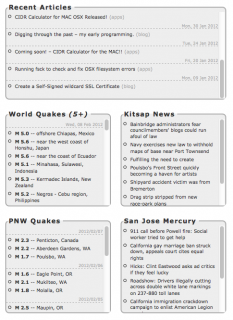
Here is a screen shot showing this first implementation worked out. Loving it in the USGS Quakes parsers/agreegators but NOT loving it in my own Blog Roll.

New daily dividers
More changes coming, I’m fairly certain of that.

Philippines Earth Quakes, follows similar activity in Vanuatu and Papua New Guinea

In what looks like sympathetic seismic activity, there has been a burst of quakes in the Philippines, just days after a string of large quakes not all that far south off of Vanuatu.

M 5.2 — Negros – Cebu region, Philippines
M 5.8 — Negros – Cebu region, Philippines
M 6.0 — Negros – Cebu region, Philippines
M 5.6 — Negros – Cebu region, Philippines
M 6.7 — Negros – Cebu region, Philippines

One has to wonder what in the world is going on there. Is this the precursor to more activity world wide? Does it mean anything at all?

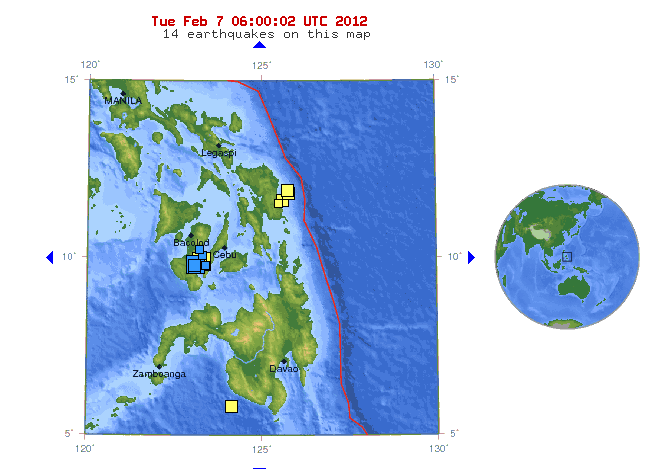
USGS PAGER Data

USGS - PAGER map of quake cluster

Other recent strings of activity:

Complete string of Moderate Quakes Worldwide

M 5.2 — Negros – Cebu region, Philippines
M 5.8 — Negros – Cebu region, Philippines
M 6.0 — Negros – Cebu region, Philippines
M 5.6 — Negros – Cebu region, Philippines
M 6.7 — Negros – Cebu region, Philippines
M 5.1 — Fiji region
M 5.2 — Mindanao, Philippines
M 6.0 — Vanuatu
M 5.2 — Kyrgyzstan
M 5.0 — southern Iran
M 5.0 — Vanuatu
M 6.1 — Vanuatu
M 5.2 — Kepulauan Kai, Indonesia
M 5.3 — Owen Fracture Zone region
M 5.7 — Vancouver Island, Canada region
M 5.4 — Samar, Philippines
M 5.1 — central Mid-Atlantic Ridge
M 5.2 — Vanuatu
M 5.6 — Samar, Philippines
M 5.8 — Tonga
M 5.4 — central Mongolia
M 5.1 — Taiwan region
M 5.1 — New Britain region, Papua New Guinea
M 5.7 — Vanuatu
M 5.4 — Vanuatu
M 6.0 — Vanuatu
M 5.1 — Vanuatu
M 5.1 — Vanuatu
M 5.2 — Vanuatu
M 5.5 — Vanuatu
M 5.0 — Vanuatu
M 5.3 — Vanuatu
M 7.1 — Vanuatu
M 5.5 — New Britain region, Papua New Guinea
M 5.0 — New Ireland region, Papua New Guinea
M 5.4 — New Britain region, Papua New Guinea
M 5.0 — near the coast of southern Peru
M 5.0 — west of Macquarie Island
M 5.3 — Easter Island region
M 5.6 — southern Sumatra, Indonesia
M 5.2 — Samar, Philippines
M 5.1 — Vanuatu

Massive Earth Quake Activity in Vanuatu this week

A series of large quakes has hit the area near Vanuatu.

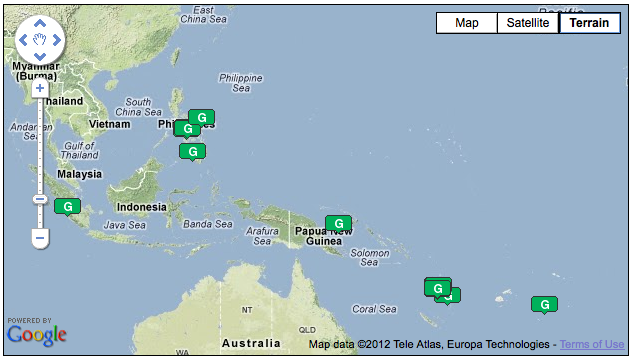
Here is a snapshot of the activity tracked on my homepage [ LINK ]. There have been big quakes near there for some time, but this is cluster of very large events:

M 5.0 — Vanuatu
M 6.1 — Vanuatu
M 5.2 — Vanuatu
M 5.7 — Vanuatu
M 5.4 — Vanuatu
M 6.0 — Vanuatu
M 5.1 — Vanuatu
M 5.1 — Vanuatu
M 5.2 — Vanuatu
M 5.5 — Vanuatu
M 5.0 — Vanuatu
M 5.3 — Vanuatu
M 7.1 — Vanuatu
M 5.1 — Vanuatu

It would appear that there is a some significant seismic activity in that region. Other areas like New Zealand and the seemingly always active Papua New Guinea are also seeing events.

M 5.0 — Kermadec Islands, New Zealand
M 5.4 — Kermadec Islands, New Zealand
M 5.2 — Kermadec Islands, New Zealand

M 5.5 — New Britain region, Papua New Guinea
M 5.0 — New Ireland region, Papua New Guinea
M 5.4 — New Britain region, Papua New Guinea
M 5.1 — New Britain region, Papua New Guinea
M 5.3 — Papua, Indonesia

The largest of the recent events [ LINK ] happened Thursday, February 02, 2012 at 13:34:40 UTC.

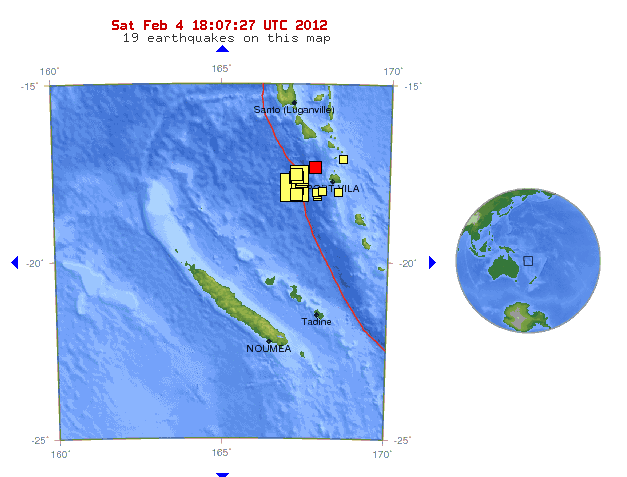
As illustrated in this clipping from the USGS Map for the event, there has been a lot of large quake activity in the last 7 days.

Fortunately, despite the area having structures vulnerable to shaking damage, the estimated threat to population due to distance is virtually nil [ LINK ]. It’s estimated less that there was a 30% chance of any fatality, and a 4% chance of more than 30.

Epicenter for the quakes appears to be on a submarine ridge between two island chains. A very nice nursery for a tsunami, should there be significant under sea land movement from a large event.

As always, I continue to watch worldwide seismic events on my home page: [ LINK ].

UPDATE: – 4-FEB-2012 21:20

More activity near the epicenter of that large quake of Vanuatu… these in just the last few hours:

M 5.0 — Vanuatu
M 6.1 — Vanuatu
M 5.2 — Vanuatu

CIDR Calculator App picked up by Softpedia

This just in…. (seems like a good thing). Notice that my new App CIDR Calculator for the MAC (in the wide for barely 24 hours now), was found by Softpedia, and linked in their site.

Congratulations,

CIDR Calculator, one of your products, has been added to Softpedia’s
database of software programs for Mac OS. It is featured with a description
text, screenshots, download links and technical details on this page:
http://mac.softpedia.com/get/Utilities/DeMartini-CIDR-Calculator.shtml

The description text was created by our editors, using sources such as text
from your product’s homepage, information from its help system, the PAD
file (if available) and the editor’s own opinions on the program itself.

Nothing wrong with a little free exposure. No ratings so far, but I hope to get some good feedback. It’s already sold several units so I know someone is out there giving it a test.

If you want to learn more about this entry in Softpedia, [ HERE IS THE LINK ].

If you want to check out the App itself at the Apple MAC App Store.. just click on the button below!

Buy at the Mac App Store

Digging through the past – my early programming.

I have been on a mission this year to simplify my life. Part of that includes disposing of once ‘possibly useful’ stuff. One such pile of ‘possibly useful’ included over 200 3.25″ floppy discs, circa 1995.

Not wanting to throw away anything that might be useful, I had to see what was on those disks. The original plan was to use an old PC that I used for LINUX development (and has a 3.25″ drive) to mount the disks and read the contents. That plan slowly devolved into a realization that things would be not be that simple. After trying to mount several disks, only to have the mount time out and fail, I came the the realization that I’d have to find a USB floppy disk drive to plug into my MAC, or (gak.. gag.. snarl) I’d have to construct a Windoze box to read those disks. As much as I found the entire concept utterly revolting, it was my only sane solution. If anyone could possibly consider intentionally installing any Micro$oft operating system as ‘sane’. So be it, that was the goal for a Friday night.

Having access to a Dell Optiplex mini-case Pentium III machine (that I bought at a computer store across town for $25 about 2 years ago), with a 3.25″ disk I decided to give it a try. Sadly, the 10GB disk drive inside was dead… so, I needed to find another old ISA drive. Such antiques are not so easy to find, EXCEPT, in my collection of stuff that would be ‘possibly useful’. This consisted of a stack of 8 drives in size from 8GB to 500GB in size.

Next hurdle was the OS. What was I going to install? Clearly a Pentium III is NOT going to run Win7, or XP for that matter. I’d have to find an OLD OS. So, that’s what I did. Being the pack rat I am, I found my old MSDN (yes, you read that right, back in the 90’s I was a registered Windows developer.. more on that below). I no longer had the full 30 DC catalog of stuff, but I did, for some reason, retain my Windoze NT MSDN install image with developer license. This… was going to be my conduit to the archive of my programming history.

I’ll save you the 1 day odyssey of dealing with the ancient and inexplicable Windoze limitations on hard drive size. Even with the cylinders and heads and a translation formula.. I ended up with only one drive that would work. And to top it off, despite Windoze complains that the max Partition size would be about 8 GB (my iPhone has more storage!), that MAXIMUM partition size the NT would install on was a 2048MB section of disk. This discovery through trial and error cost me several hours and I’m guess at least 1 year off my life.

Finally, I was able to start going through the disks. This is when I came to the realization that my LINUX box just *might* have been able to read the disks all along. Out of the 200 or so disks, only a handful were usable. Most were either un-formatted, or so badly degraded that the CRC errors (you remember CRC errors… I do, except now I’ve suddenly developed a slight tick.. the costs of Windoze can’t be measured in dollars alone.. oh now.. oh no indeed.). Odds are, ever disk I tried to use was junk anyway. This is something I need to follow up on later this week.

In the end, the Dell Optiplex Pentium III was brought to live running Windoze NT. I nightmare of an OS if ever there was one. In fact, I recall in my 1st stint at Hewlett-Packard (mid 90’s) we were forbidden to even mention Windoze NT in our workgroup. The fear of NT vs. HP-UX 9.0 in the market place was great. In retrospect, the comparision is laughable. HP-UX was a real UNIX system, with a real UI, Windoze was.. well.. garbage. The really sad part was that NT won the market share war. There is no accounting for intelligence within IT management.. this is an axiom proven again and again. Digressing….

Most of the stuff I found on the floppies that I could read was worthless. I did have some old 90’s website content that some day I might pull off and do a way-back machine sort of look at my very early web development work when Netscape 1.0 was king and there was no such animal as Internet Exploder. Really, and sadly, I suspect many people cannot even image that… tsk tsk.. sorry for you, I truly feel).

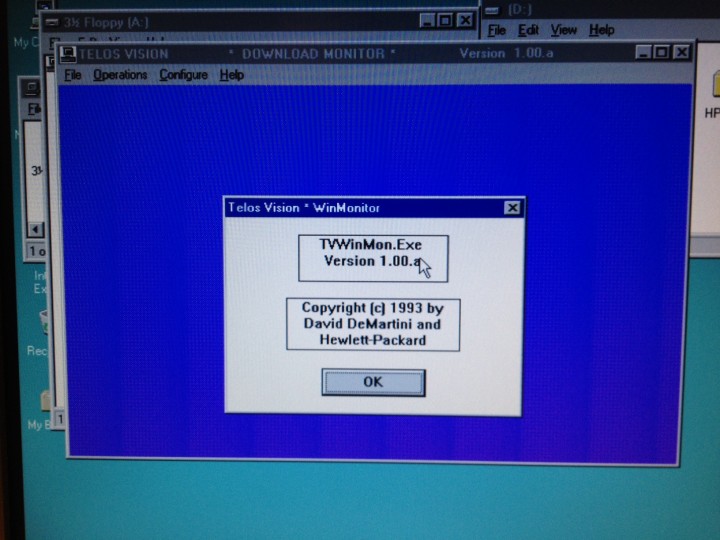
I did manage to find one good working bit of code, and I’m including a screen shot of it here.

This is a bit of code that I wrote using Borland (10,000 points if you remember Borland and know where their headquarters were… 1,000,000 points if you have a photo of it, that you took!) Borland C++. Having had the choice of using the MS Frameworks or buy my own compiler, I bought my own (and it was not cheap I can assure you) full blown compiler. I was even part of their developer and Beta tester network. I had some early releases of BladRunner (a DB precursor to Paradox) in floppy, but I tossed those out during the purge. Shoot.. digressing again….

When I was working at HP, we had a set of very crude batch scripts that performed the very critical task of monitoring our telemarketing PC’s located across town in Santa Clara (the data center where I worked was in Sunnyvale). The batch script ran on a dedicated PC in our data center. It was a fragile concern at best. While working grave yard baby-sitting multi-million dollar equipment, I took it upon myself to take some C and C++ programming classes at the local college, and use my time in the data center to get my homework done. While writing code, it was quite clear to me that this fragile batch file system would be released with a proper Windows program, that would be more robust, provide more information and not require the PC to site there running a single program that would crash if anyone touched the keyboard (it would interrupt the batch file.. whom ever came up with the idea should have been fired on the spot!)

I took a couple of nights to re-write the entire thing in C++, as a Windows application. Here is a picture of the screen with the ‘About’ dialog. Since the constellation of PC’s it monitored were of course not on my home network (there were tossed in the trash at HP around 1997), there was not much else to show.

Telos Vision - Download Monitor

It sure did bring back some memories and let me to think back about the extensive amount of programming experience I have on a wide variety of platforms and languages… sometimes I get so focused on my current objectives, I forget how much programming experience I bring to the table, well over 20 years worth.

I also found a couple of command line and basic text windowing programs that I actually sold for $6.00 a copy back in the late 80’s. Yes, I’ve been writing and selling software for nearly 30 years. Yes, you read that right 30 years. It’s even hard for me to think about that.

Thinking back, to my first experience with a computer, it was at UC Berkley back in 1976. At that time, the computers were all timeshare machines, and time on them was not cheap. There were no monitors, or terminals. Interaction with the computers was via binary status boards (recall all those blinky lights on computers in old movies.. yeah.. that’s what I’m talking about) and the rare interaction with teletype style printer terminals. People allowed to directly interact with computers were highly trained individuals, no mere mortal was allowed to come in contact with a computer. Quite the contrast to today, where even those with the least of ability are allowed to not only touch them, but they can OWN then! And worse yet they are allowed to connect them to world wide networks. The concept of this so foreign and frightening to those early computer scientists.. the thought of it every happening was simply an impossibility. Who would be so stupid to allow that sort of thing to happen? Well, I think that history on that is documented well enough I need not even attempt to cover it here.

Now, I wonder if I can fix those disks with the CRC errors? Where is the old dial-up BBS that kept that fixdisk.exe. program I loved so much?

Writing an Apple Help Book

Writing and distributing Apps for OSX compared to those written for the iOS environment is mostly an entirely new adventure. The underlying code is the same, but the concepts of UI design are radically different. Then there is the entire topic of Help Files, or in the case of OSX, the Apple Help Book.

Having several decades of experience as a software designer, developer and distributor, the concept is not new territory. Deploying it in OSX is, however a new skill to be learned. To help those that follow boil all this down I’m going to expose my personal notes on the subject. These notes were derived while using XCode 4.2, in January 2010 [ Detailed Online Information at developer.apple.com ]

Why Apple Help Book?

Flexibility — Writing and deploying an Apple Help Book with the application provides indexed search capability of the Help data, via the OSX Help menu while running the App. Once registered in the Application package itself, it integrates smoothly into the user experience.

What is special about Apple Help Books

They are HTML based. — This makes production of help files for the Application simple. HTML editors are widely available for those that do not have the technical chops to produce the file the good old fashioned way.

Rich Content — Help books can contain video content and even Apple Script to automate help navigation or even perform application manipulation directly from the Help construct. Niiiiiice.

What is a Help Book?

HTML Content — The book consists of a collection of HTML files that constitute the Help documentation for your application.

Indexing Help — Apple provides Help Book Indexing tool located in /Developer/Applications/Utilities, when the Developer package is installed. .

Help API — Contextual help is made available, from the Help Book via a provided Apple Help API. You do not need to utilize this capability for basic help function, but it’s available for advanced Help capabilities.

Exact Match Search for small words — A common problem with basic search functions, is that small or common letter groups may product far to general of a response. Example would be searching for the term ‘CD’. A Help Book with the properly configured Exact Match Searching would be able to return targeted help results for ‘CD’.

Can live In the Cloud — Concept of Apple Help supports the ability to access and deliver content from remote servers (aka the cloud), in three different ways; Internet-only, Internet-primary and Local-primary. It also has the ability to signal need to download and updated Help file for local (end-user) storage.

Links to Online Resources — It’s perfectly acceptable to code the Help Book and it’s title items to be links to locations on the web. An example of this might be a link from the Help system back to the producer’s main website for support or additional help content.

Authoring a Help Book

Full Document Online –[ Click Here ] for the full article on Apple’s Developer Website.

Racing, Photography, Software and Politics.