This is going to be a VERY quit little missive. Basically, it’s about knowledge retention. The more I write about something, the better chance I have remembering some detail months or years hence. Today, I’m recording, for posterity (sounds pretty snooty, I know), the Objective-C command for opening a URL.
I won’t pretend to know all the details of this, and why it requires so many messages to be passed. In this case I’m admitting I was a cut-and-paste code monkey, standing on the shoulders of others. So, enough babbling, here is the meat of it. This ASSUMES you have a way to call this, such as a class method, or something. To clarity, this is writting into your implementation (.m) file.
The above does NOT maintain context within your app. This tosses the user out into Safari to view the page. Had I added a URL View page to the application, it would have appeared there. Perhaps in version 2.1, but for now, for today, this works. I’ve tested it, verified it, and trust it.
I originally ran into this issue back in November of 2010, while writing the original version of my iCIDR tool (hey network admins, you should buy this awesome tool now, before the price goes up!).
It’s trivial to enable a keyboard and to change the button, BUT to make it go away, and then actually wire that event into your code to do something use is not as simple as I had originally hoped!
Strategy entails using the keyboards ‘Return’ key to signal that one is done. Seems useful, but only if you have a single line text input. In my case, that’s what I’m looking at, single line input, so that’s the solution I’m going to try.
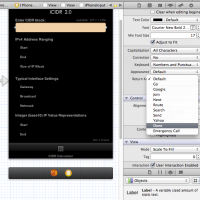
First order of business is to highlight your text area (I’m only going to be addressing the text input object), and shift to the properties tab (icon looks like this: ). Change the dropdown to the ‘Return Button’ text you wish to use. I like to use ‘DONE’, so, that’s what this image shows. Oh.. and yeah, you are also getting a little sneak peak at the newest generation of iCIDR.
The tricky part is understanding that you need to make sure your ViewController’s header file is modified to implement UITextFieldDelegate.
This is how that might look:
@interface iPhoneCalculatorViewController : UIViewController  {

    UITextField* seeTextField;

}

@end
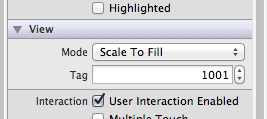
Now, when the view loads, the Text box in the view needs to be addressed and wired up to the Keyboard action. Even though I defined a nice fancy label name for my object, so far I’ve only found this method to address the object ID by it’s ID. I think this is pretty funky but, cest la vie. Here is where I set the tag, also in the same view organizer dialogs:
Following that I enabled viewDidLoad (boilerplate code normally commented out), created a local variable pointer to the View’s input text box, and then set a delegator to that pointer in the main ViewContoller.
// Implement viewDidLoad to do additional setup after loading the view, typically from a nib.

- (void)viewDidLoad

{

    UITextField *iPhoneInputText = (UITextField *) [self.view viewWithTag:1001];  // try to locate the object with the tag

	iPhoneInputText.delegate = self;  // assign a delegation.

    [super viewDidLoad];

}
Moving along, I had to implement the The textFieldShouldReturn method in my ViewController class. This had to be defined to execute on the abandonment of the first responder:
// Should trap all Keyboard Return Events

- (BOOL) textFieldShouldReturn:(UITextField*)textField {

    [textField resignFirstResponder];

    //[self calculateOperation];  // ENTRY POINT

    return NO;  // default return value is YES, this is changed to NO to....   (sorry, now I've forgotten!)

}
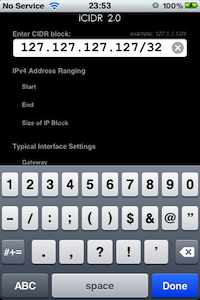
Here is the keyboard that pops up, with the highlighted ‘Done’ button.
iCIDR 2.0 - keyboard in action (still photo)
The method (BOOL) textFieldShouldReturn is now registered to get the text input object the keyboard was typing into.
Now it’s your job (and mine…) do make it do something useful!!
Aired 30-November-2011
Interview with inDinero‘s Co-Founder and Architect Jessica Mah. Jessica discusses business accelerators, Angel investors, common start-up mistakes and why she feels it’s not good to “Fake it until you make it.”
inDinero was founded by two people. Jessica said that having a co-founder was really important. Having a trusted person that can confirm or refute ideas is very useful. Thinking about what your company culture should be up front, it’s OK to have a fun working environment (she likened inDinero to more like a club), but it still needs to be run as a business. A party culture is not likely to succeed. One thing they do to maintain a cohesive workforce and to exchange ideas, is to get out of the office once per week and all have dinner together.
Jessica related that they got a great jump start on the company, but applying to and becoming part of Y-Combinator, which provides a small amount funding for start-ups. She had very high praise for Y-Combinator, and said she she sometimes wishes they were still in that environment. At the end of Y-Combinator they had the opportunity to pitch their company to a variety of potential investors, and as a result of that they raised over $1,000,000 in start-up funding.
inDinero decided to go strictly with Angel investors, and not Venture Capitalists. Going with the Angel investors had a number of advantages. Along with having more direct control over the organization, as opposed to going with VC’s, she felt they had a larger group of advisers with which to consult. That said, she also cautioned against raising money too early.
But even with million dollars plus in funding, things were still not easy. This added significant stress and pressure to perform. She wished that they had taken as much funding as they possible could up front. They had under-estimated the costs of mistakes, such as leasing a fancy office, or making bad hiring decisions.
One of the toughest lessons they learned, was that money goes fast. Keeping control of costs, despite what seemed to be ample funding, is critical to remaining both operational and emotionally strong. One costly mistake they made was the leasing of a nice fancy office. It presented a nice face for visiting clients, but internally Jessica said she felt more like a con artist, knowing the reality of their success. They have disposed of the fancy office (that included a hot tub), and are now operating out of an apartment. She felt that it made them feel more scrappy, as opposed to content.
Staffing the company also turned out to be more challenging than she anticipated. The practice of hiring on intelligence alone, turned out to be a mistake. Employees need to be rounded, able to work well with others, and also with customers. They found that the best way to get the A-Players that every start-up needs, is to give the a test drive first. It’s the fastest path to finding the gold. You only want to keep A-Players. Having under performers in a seat is far more costly than having that seat empty (this is painful lesson I’ve learned as well, and one I’m still trying to address). Bottom line, It’s better to leave that seat empty.
Being a technology company that delivers it’s product over the web, product design and testing is a critical part of remaining useful and relevant. Useability testing was the smartest thing they did. Usability testing has to be done IN PERSON. It’s the only way to do this (Steve Krug, a well known author on UI design covers this in his book Rocket Surgey Made Easy). They met with dozens and dozens customers to find out what what the product really should be. It’s not unexpected that the product will need to adapt to the reality of customer desires. However, that does not mean that the product needs to change to meet every customers every need. For example, some features desired would have turned their product into a full blown accounting system, and they had to point out to those customers that they signed up with inDinero because they wanted something simple, not a big full-blown accounting system, and they were not planning to move in that direction.
Several lessons were learned along the way. Customers do not care about elegant or prefect code. The product evolution was iterative. One simply can’t figure out everything customers wanted up front, and simply pumping the product up with tons of features is not a good road map to success.
Long term product release planning was also a hindrance. They found that planning product released 3-6 months out was far too long. Customers couldn’t really wait that long for the features they needed, so they shifted to a 2-3 week product plan cycle. In contract to that less though was the imperative to NOT release too early! She said that start-ups must resist the urge of investors to release a product too early. Instead they bowed to the pressure and initially released the product too early, squandering a lot of useful PR with and immature product.
One tool they used to gain access to customers that would provide useful feedback on the product was placement of a “Would you recommend” link. That link asked them if they would recommend the product, if they felt the product had promise, or they simply didn’t like the product. Jessica focused on those that thought the product had promise, but would not recommend it. She found they to have the most useful feedback. Those that indicated that they simply didn’t like the product were customers that they really didn’t need their product anyway.
Finally, there were a few other important observations and tips.
Don’t get yourself hung up on vanity metrics, like followers, hits, etc. Stick to the metrics that matter like adoption and revenue.
College didn’t teach them how to build real world useful products.
A business plans seldom survive first contact with customers.
“While Facebook isn’t acquiring the Gowalla service or technology, we’re sure that the inspiration behind Gowalla will make its way into Facebook over time,” the company said.
The article also noted that the founders, and an undisclosed number of employees will be carried over to Facebook. Now, if it has been all or nearly all, they would have played that angle up. However, I believe they are just taking a few lucky and key souls along for the next ride and setting the rest adrift in the world of unemployment.
This is not just a guess, this is a common scenario in these sort of games of mergers and acquisitions. I’ve seen this happen with start-ups I’ve helped propel forward. In most of those cases, I was duly compensated, and in a few cases had the chance to enjoy the ride-along, if only for a little while.
Good luck to those that will undoubtedly get their Gowalla pink-slips, courtesy of Mr. Zuckerburg and Facebook.
For reasons far beyond this, I’ve already cut my FB usage down to a trickle, mainly using it for marketing my own ideas and soon to be publicly available products.
If Windoze VISTA was a car.I’ve said it for decades. Windoze stinks! Horrible, horrible stuff that keeps lots of unfortunate geeks (I mean unfortunate that they have to deal with it, not that they have jobs) busy.
Sure, there are lots tens of cases where Windoze machines have stayed happily running unattended for hours on end. Sadly, it’s not the norm.
My professional career has been carefully crafted to limit my expose to such software, however yesterday my careful maneuvering to avoid direct interaction with a Windoze system was subverted by a high-priority work project. Being the ‘big cheese’ in IT, I decided to avoid the inevitable lamenting from my team and tackling this task myself. I tesitmated it should have taken an hour or so of my time to complete, no big deal.
No….. big….. deal…. right. Here are the redacted entries from my task tracking system. The project name has been changed to protect the innocent, the remainder of the details remain pertinent. Keep in mind that these are my self-edited comments, the actual barrage of what some would consider offensive language (such as the word, VISTA) was quite a bit more verbose.
The start of it all, after having another piece of hardware originally proposed, declared unsuitable due to restrictions on virtualization by the software vendor.
Comment 8 :: 2011-11-16 09:55:32 PST
Additional hours worked: 1.0
Windoze compatible box sourced. Vista installing now. Will configure to VLAN
once that is deployed, will turn on a firewall and punch out just those ports
we need for this thing to work (another hour of my time spent on this).
Things seemed to be going well. A shrink-wrapped 32-bit copy of VISTA was dropped into the CD-DRIVE. Issues with getting the American Megatrends BOIS to read the ‘DEL’ key on my USB keyboard turned out to just be the tip of the ice berg. A harbinger of doom. Why does all this commodity hardware so massively suck?
What is missing in my commentary was an hour long fight to get VISTA to recognize a simple RealTek NIC. Now, the OS understood what it was, but the horrible M$ network driver could not work with it.
Thank goodness I had a MAC handy to access the outside world, hunt down the driver and place it on a USB drive for install onto the new machine. It sounds simple, however VISTA seems to have some built in requirement to install everything at least 3 times before it actually works. After some grunting and a trip to the break room for a fresh bucket of coffee, I embarked on the most frustrating part of the entire experience. Trying to install M$ .NET 3.5 Framework and Service Pack 1.
After almost two hours of fighting with the BIOS, setting boot to the CDROM drive and getting a SIMPLE network driver installed:
Comment 9 :: 2011-11-16 11:50:57 PST
Additional hours worked: 1.75
I have tried 3 times now to get the .NET 3.5 SP1 to install, but there seems to
be some network issues with the M$ server(s), and it times out after about 35
of the 39 MB (I have verified that our network speed is perfectly fine). I
might switch it over the the backup network and try it there if it keeps
failing, worth a try.
The vendor software has been downloaded and copied to the new machine’s
‘downloads’ directory.
At one point during the attempted installs, I had two messages on the screen. On saying there was an error encountered during the installation (no indication what that error or situation was… debugging? Pffft. I guess trying to debug software that *is* a bug is an oxymoron), but stacked above that error dialog was another saying the software was properly installed and I heeded to restart the computer. Turns out, that the first dialog was correct.
Comment 10 :: 2011-11-16 13:39:26 PST
Additional hours worked: 0.75
dotnetfx35setup.exe has failed 3 times now. In the last failure, it shows
“Install Stopped – Error Occurred” in one dialog, and in an overlapping dialog
shows “Restart Required to Complete Installation”, at which point I rebooted,
restarted and logged back in, restarted the vendor software install and it
said that .NET Framework 3.5 was required, and asked me if I wanted to install
it (again..). I replied NO (because I don’t want to). Went looking for the
actual file on the MS site and will try that. Also found the ‘full’ version
(which is about 100 times larger than the one it wanted to auto-install), and
will give that a try too. It’s amazing anyone would still buy M$ products
after VISTA.. this thing is a real pile…..
To at least have a fighting chance against compromise, I’m installing SP1 for
Vista. This will take at least 1 hour (according to the install manager).
It’s unlikely that the vendor software will be installed today, since I
still need to find some way to make it install the .NET 3.5 Framework (4th
times a charm running a full product install, maybe?)
Having failed to successfully install .NET in several different ways, I decided that perhaps first installing VISTA SP1 would somehow help. This was another incredibly frustrating undertaking, but this broke the mold and installed on the 2nd try. After several reboots and twice running through the ‘3 steps’ (why not just call it 6 steps instead of trying to fool people, or maybe the various engineering departments responsible for SP1 didn’t talk to each other and they had not idea their 3 parts where part of a larger set of parts? Who knows what goes on over there in Redmond.
Comment 11 :: 2011-11-16 15:12:38 PST
Additional hours worked: 1.75
VISTA SP1 install completed.
Full DOTNETFX35.EXE install attempt number.. who knows, but it’s not attempt
#1.
And finally, it seems to think that .NET 3.5 has installed. No errors, no
restarts, no conflicting dialogs. I guess you have to be insane to use
Windoze, because doing the same thing over and over and over and over again and
expecting a different result IS expected. This really dose explain at lot
about modern society… if this is somehow ‘acceptable’ and ‘expected’…
well.. I guess monkey see, monkey do for PC users.
Oh.. how naive I was. Following the successful install of .NET 3.5, and then
the download and install of .NET 3.5 SP1, the installer indicates that .NET 3.5
was *not* successfully installed (despite what the installer noted just a few
minutes before) and .NET 3.5 needs to be ‘repaired’ and returned to it’s
‘original state’. Basically, the fresh install was bjorked. I’d just ignore
.NET 3.5 SP1, except the vendor software installer specifically looks for
SP1 and will force install. Of course one could just not install the vendor
software and go on with life, but that’s not an option for this project.
Re-running the SP1 updater yet again, and now it want’s to download another
20MB file, which is very slow to download from M$. But now that it’s
downloaded and that install is starting up, perhaps there is once again, reason
to hope.
My insanity has paid off! At least there is no a .NET 3.5 SP1 install
successful message on the screen.
Issues with the bizarre way the vendor software installs (it actually makes
the VISTA install seem sensible) it *seems* to be telling me that it’s
installed, AND there is an application hot link on the desktop to a Product Monitor.
I have shut the machine down and will be passing it over to the Senior Sys Admin for
configuration and installation within the VLAN.
At no time in the last 6 years working with ‘difficult’ open source LINUX distributions have I ever had this much trouble, frustration and time wasted on a computer. A simple computer, designated to run just one software package.
When people say the TCO of Windoze is low (which is of course a lie), they must not have taken into account actually having to INSTALL and patch the OS it self. I can’t imagine what fresh hell this thing will be in our organization. Hopefully locking it in our dmarc room, on it’s own private network will keep it from causing too much chaos. Although I will have to present a written apology to my Sys Admin group for inflicting this upon them.
UPDATE!
My senior Systems Admin just sent me this message regarding the VISTA box I abandoned yesterday at 15:45 while it was (as it said) 1/2 way into applying some un-requested updates.
Thursday, November 17, 2011 10:32
The updates are still running on Windows box. […]
That is really impressive. This install is now bumping up against the 24 hour window.
ANOTHER UPDATE – November 20, 2011
After two days of dealing with Windows VISTA (arguably the worst from M$ yet, and that’s quite a heavy indictment), we pulled the plug on it, spent $300 for a crappy commodity computer with Win7 already installed, applied the patches and plugged it into the network.
VISTA… wow.. I knew it was bad, but I didn’t know it was THAT BAD! I’m going to tell the CTO that we should tell M$ we want a refund for that pile of junk.
Here is a breakdown, from Apple, highlighting the over 200 and new features in iOS 5!!
Notifications
Swipe from the top of any screen to view notifications in one place with Notification Centerthis is one of my favorite features. When you receive messages, voicemail or calls while ‘away’ from your phone the alerts are stacked on a screen that can be accessed by simply swiping down the screen. Much less intrusive, and very, very useful
New notifications appear briefly at the top of the screenbig improvement over the modal dialogs that popped up on previous versions that disrupted anything you where doing at the time
View notifications from lock screenswipe down from the lock screen and jump right to a notice, message, call, etc.
Slide the notification app icon to the right on the lock screen to go directly to the app
iMessage
Send and receive unlimited text, photo, and video messages with other iOS 5 usersthis is a great feature. For instance I’m able to communicate with my daughter’s iPhone from my iPad, no need to grab my phone if I want to send her some info I found on my iPad – great productivity boost. Plus, it does not required the cellular SMS transport technology!
Track messages with delivery and read receiptsknow when the recipient read the message – very nice
Group messaging and secure encryption
Works over cellular network and Wi-Fi*very nice!! avoid SMS charges when roaming, especially overseas. While in Spain I communicated with my boss with SMS quite often, but when I got home 1/2 of big fat cell bill were SMS charges!!! This should reduce if not eliminate that.
Newsstand
Automatically organizes magazine and newspaper subscriptions on Home Screen
Displays the cover of the latest issue
Background downloads of new issues
Reminders for managing to do lists
Syncs with iCloud, iCal and Outlookkeep calendars on multiple devices in sync. I’ve had some issues with this where any calendar entry already synced across devices, now created a separate entry from each device, messy. Might be something I didn’t do right.. but I’m not totally tech ignorant, so I think others will find that glitch annoying
Location-based reminders when you leave or arrive at a location for iPhone 4S and iPhone 4
Built-in support for Twitter
Sign-in once in Settings and tweet directly from Camera, Photos, Maps, Safari and YouTube
Add location to any tweet
View twitter profile pictures and usernames in Contacts
Camera improvements for devices with cameras
Double click the home button when device is asleep to bring up a camera shortcut on iPhone 4S, iPhone 4, iPhone 3GS and iPod touch (4th generation)
Volume Up button to take a pictureever hold the phone in landscape mode and fumbled to press the front button, well I have, and enabling a side button is a real awesome feature, sort of like a ‘real’ camera
Optional grid lines to line up shotsThis really helps me, I often tild my cameras for some reason, nothing like a little help
Pinch to zoom in the preview screen
Swipe to camera roll from preview screen
Tap and hold to lock focus and exposure, iPad 2 and iPod touch (4th generation) only support exposure lock
Photo improvements for devices with cameras
Crop and rotate
Red eye removal
One tap enhance
Organize photos into albums
Mail improvements
Format text using bold, italic, or underlined fonts
Indentation control
Drag to rearrange names in address fields
Flag messages
Mass mark messages as flagged, read or unreadwhat once was just an option to bulk delete, now offers these other bulk actions, a nice improvement
Customize mail alert soundsOK, this is the first I’ve not done myself, but I love the custom sounds for SMS, so I’m going to be trying this today!
S/MIME
Calendar improvements
Year view on iPad and new Week view for iPhone and iPod touch
Tap to create an event
View and add event attachments
Game Center improvements
Use personal photos for your Game Center account
Compare your overall achievement scores with your friends
Find new Game Center friends with friend recommendations and friends of friends
Discover new games with custom game recommendations
AirPlay Mirroring for iPad 2 and iPhone 4S
Multitasking Gestures for iPad
Use four or five fingers to pinch to the Home Screen
Swipe up to reveal the multitasking bar
Swipe left or right to switch between apps
On-device setup, activation and configuration with Setup Assistant
Software updates available over the air without tethering
this is great, no longer need to plug into the computer, get your apps and music ‘magically’ over the air via iCloud.. awesomeness
iCloud support
iTunes in the Cloudawesome, using it a lot
Photo Stream
Documents in the Cloud
Apps and Books automatic download and purchase historymega awesomeness, new apps I bought appeared everywhere I wanted it, no need to do much of anything at all!
Backup
Contacts, Calendar, and MailSyncing all devices behind the scenes, off-line and without hands-on action. As noted, the only thing I’ve had issues with were some duplicate calendar entries
Find My iPhone
Redesigned Music app for iPad
Hourly weather forecast
Real-time stock quotes
Wireless sync to iTunes
Keyboard improvements
Split keyboard for iPadI dig this (see my other post) thumbs much happier now
Improved autocorrection accuracy
Improved Chinese and Japanese input
New Emoji keyboard
Personal dictionary for autocorrection
Optionally create keyboard short cuts for frequently used words
Accessibility improvements
Option to light LED flash on incoming calls and alerts for iPhone 4S and iPhone 4
Custom vibration patterns for incoming calls on iPhone
New interface for using iOS with mobility-impairment input devices
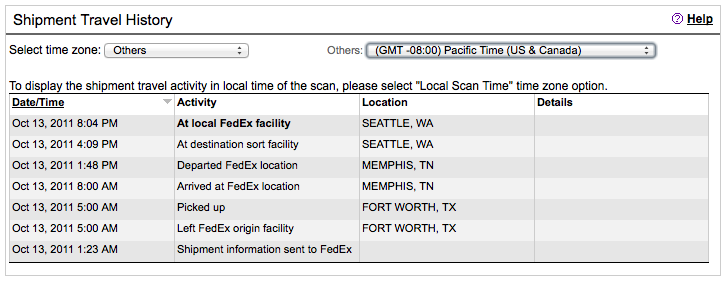
I received the shipping confirmation and tracking code yesterday. I’m quite excited about tracking my little phone package back and forth across the US:
The FedEx site seems to lag several hours behind the tracking updates. As of midnight, the status was still showing;
At 03:00 this morning, it’s showing that it arrived at BFI yesterday evening: iPhone Package Tracking
I was hoping for a something a little more NRT (Near Real Time).
Those of you that have checked out my new website see that I’m all about displaying the latest data I can acquire.
Then there is the question of why I am awake at 03:00 PDT to even LOOK at this data. Insomnia is a regular part of my life.. something I’ve battled for years.. and some of it might be childish anticipation of playing with an awesome new toy, phone.
Even when it arrives some time Friday (today), I will have to go through several steps to get it activated. How many.. a lot.. (me thinks). This is direct from my ‘Welcome to the Borg’ e-mail sent from AT&T:
Congratulations! With AT&T, you get the nations’ fastest mobile broadband network* and the best coverage worldwide – more phones that work in more countries**.
To Activate your Device and utilize the entire suite of features included with your service, you MUST follow these steps IN ORDER;
1. Charge your iPhone.
2. Check all voicemail messages on your existing device. Once your new iPhone has been activated, all voicemail messages and greetings on the former device will be lost. (Existing AT&T Customers Only).
3. Turn it ON and follow the on-screen instructions. Your iPhone may prompt you to connect to iTunes via a Mac or PC. Install it for FREE!
4. Synch iPhone with your contacts, calendars and bookmarks on your computer and with music, video and other content from your iTunes library.
5. Activate your device online at some-website or by calling 1-555-555-1212 from another phone.
6. Turn ON your iPhone and make a test call. If your test call is not successful, wait one hour to allow the activation process to complete then try to make another call.
Once in hand, it’s going to be at least an hour of charging before I can even start to migrate the many gigabytes of information, contacts, photos, songs, videos and notes from the old white 3GS to my new white 4S.
I’m glad they released the white phone right out of the gate this time. I think they lost some initial iPhone 4 sales while people who like white phones (such as myself) waited out the initial order surge. Could this explain the massive initial orders that completely blew away the iPhone 4 release records? Probably not, but it was a factor for me. It removed the decision to wait for the white phone or order the new black one and live with it.
So.. here I sit, at 04:12, typing up a half-coherent ranty blog, wondering if I’ll get back to sleep or I’ll simply fire up the VPN and perform some of my day job.
What’s not to like about a shiny new OS update for the Apple Mobile platforms? It’s new, so, it has to be better? RIGHT?
Well, yes, it IS BETTER! And it fixes some long nagging short complaints I’d had, mostly simple little things. The most interesting ones I have tried so far, are discussed here.
Check out my ‘iOS New Features Rundown Post for more details!
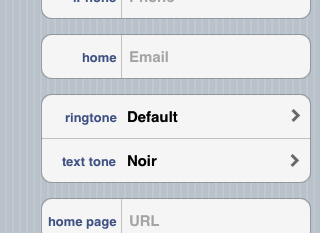
Now you can assign custom Text Notification Tones
YES! Finally! I can set a custom tune (like a silent one.. for those really annoying people) for both phone and text communications for any Contact in your Contacts List. And not only that, they implemented it so you don’t need to use the same tone for both. This is something I really REALLY like! Setting separate Ringtone and SMS Tones - new in iOS5
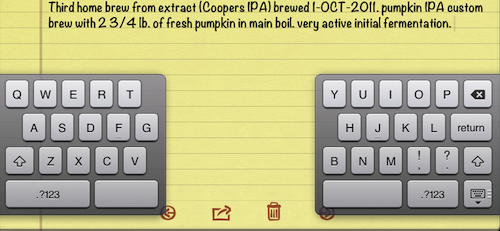
iPad Split Keyboard. Thumb-typing made easy!
Every wish that your thumbs were a little longer to reach the keys in the center of the iPad keyboard? Well, maybe you wouldn’t want them longer, how weird would your hand look, right? Well, at least they could have done something….. and…. they did. Introducing the split keyboard on the iPad. Split keyboard makes thumb-typing easier on the iPad!
Above, I am testing out this cool new feature while updating my Brewer’s Log. Too bad most of you won’t be able to taste this amazing Pumpkin IPA when it get’s kegged in less than a week!
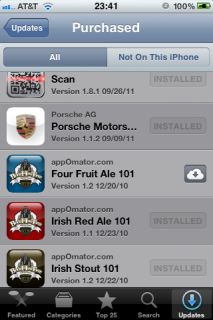
iCloud delivery of your purchased Apps, from the cloud!
I’ve already found this to be one VERY useful feature. What I’m showing here is the App Store on my phone, and you can see one of the Apps has the little cloud icon next to it. That means I’ve purchased this application, but it’s not installed on this device. Now, instead of having to be wired into a computer to get easy access to my already purchased Apps, it’s available, over the cellular network, or WiFi, from a cloud storage area just for your apps. So, what’s the big deal? Well, if you want to add the app to this device, it’s as simple as pushing the ‘iCloud’ button and viola.. it’s downloading to your device! iCloud and App Store working together
Another really nice feature, that is not illustrated in this photo, is that you can configure your account to automatically download any purchased app to ALL your devices (automatically, not need to sync) from this iCloud account. I’ve use this feature already as well and I love it. Again, no need to plug into the computer, or track down the app in the App store. It’s all done for you (of course you can turn this feature off it you like), easy as Apple pie!
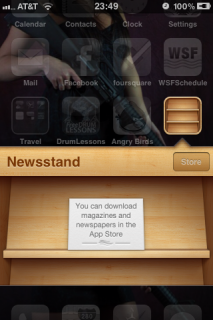
News Stand – get your electronic magazines on your mobile device!
Do you have a hard-copy magazine that you subscribe to? Maybe they have a mobile version too. If that is the case, you can (again automatically) receive the latest edition, downloaded to your News Stand (here comes that iCloud thing again…) as soon as it’s published. This is a feature I’ll be making use of for certain (sorry, I’d not yet tracked down my magazines when I took this photo… I’ll be sure to update it when I do). New App - the Apple Newstand - get it hot off the presses!
Handling of SMS and E-mail alerts on various screens
For you current iPhone users, you know how annoying it is to get an SMS (or if you have e-mail alerts on, and e-mail) while on the phone or using another app. It pops up a modal dialog box and completely interferes with whatever it is that you are doing.
NO MORE! The alert boxes are no longer modal, and if you receive an voice mail and an SMS at nearly the same time, the alerts are neatly stacked together, and after a few seconds, these automatically disappear from the screen. They are smaller, less obnoxious and they GO AWAY on their own! Finally!
It was a warm and sunny day along the California Coast for the last day of the California International Air Show, in Salinas CA. Only 45 minutes south of my friend’s hose in Santa Cruz, CA. it was easy to plug this event into the last day of my vacation.
After 2 weeks in the sun, I needed some shade. Another full day in the sun and I’d likely return home with a burn, so I lobbied to purchase the VIP Flight Deck tickets. It was an easy sell. The flight demonstration teams always work in a couple of extra tricks right in front of the VIP seating areas, and we’re at an air show after all. Accommodations where good. Food, snacks, soft drinks and a fully bar were all at our disposal, and the first round of drinks were included in the price.
The performances were great. Plenty of jet action in the air.
One of the highlights of the show was the TORA TORA TORA performance. It’s a 10 minute show using aircraft from the original 1970 movie TORA TORA TORA. It’s a sight to see, so I’ve uploaded video shot with my little Canon camera set on the fence (it get’s bumped a few times so the framing missed the final WALL of FIRE, which I found unfortunate).
When the SnowCones took to the air, we decided to move onto the static displays. I’ve seen the very polite and nearly silent (and I’m sure very environmentally conscious) SnowCones enough times to fall asleep during their show. I had a 900 mile drive ahead of me that night, and I needed to remain alert. Oddly the couple of times I looked up into the sky, they always seemed to be speedily (albiet quietly) flying away… hm… I wonder if they are all French Canadians…).
So off to more interesting things likes Cessnas and Piper Cubs.
As some of you might have read in my Tech Feeds today, Netflix has backed off form the Quickster project.
Here an e-mail I just received from them. Nice Mea Culpa. “Uh.. er.. sorry.. we’re sorry.. prices still going to be same but no new DVD only website.”
Dear David,
It is clear that for many of our members two websites would make things more difficult, so we are going to keep Netflix as one place to go for streaming and DVDs.
This means no change: one website, one account, one password…in other words, no Qwikster.
While the July price change was necessary, we are now done with price changes.
We’re constantly improving our streaming selection. We’ve recently added hundreds of movies from Paramount, Sony, Universal, Fox, Warner Bros., Lionsgate, MGM and Miramax. Plus, in the last couple of weeks alone, we’ve added over 3,500 TV episodes from ABC, NBC, FOX, CBS, USA, E!, Nickelodeon, Disney Channel, ABC Family, Discovery Channel, TLC, SyFy, A&E, History, and PBS.
We value you as a member, and we are committed to making Netflix the best place to get your movies & TV shows.


 ). They met with dozens and dozens customers to find out what what the product really should be. It’s not unexpected that the product will need to adapt to the reality of customer desires. However, that does not mean that the product needs to change to meet every customers every need. For example, some features desired would have turned their product into a full blown accounting system, and they had to point out to those customers that they signed up with inDinero because they wanted something simple, not a big full-blown accounting system, and they were not planning to move in that direction.