Tag Archives: debugging

Testing Qidi 4Plus Wireless Performance

The Qidi 4Plus printer performs well, prints multiple materials, has a quality enclosure and an acceptably performant touch screen.
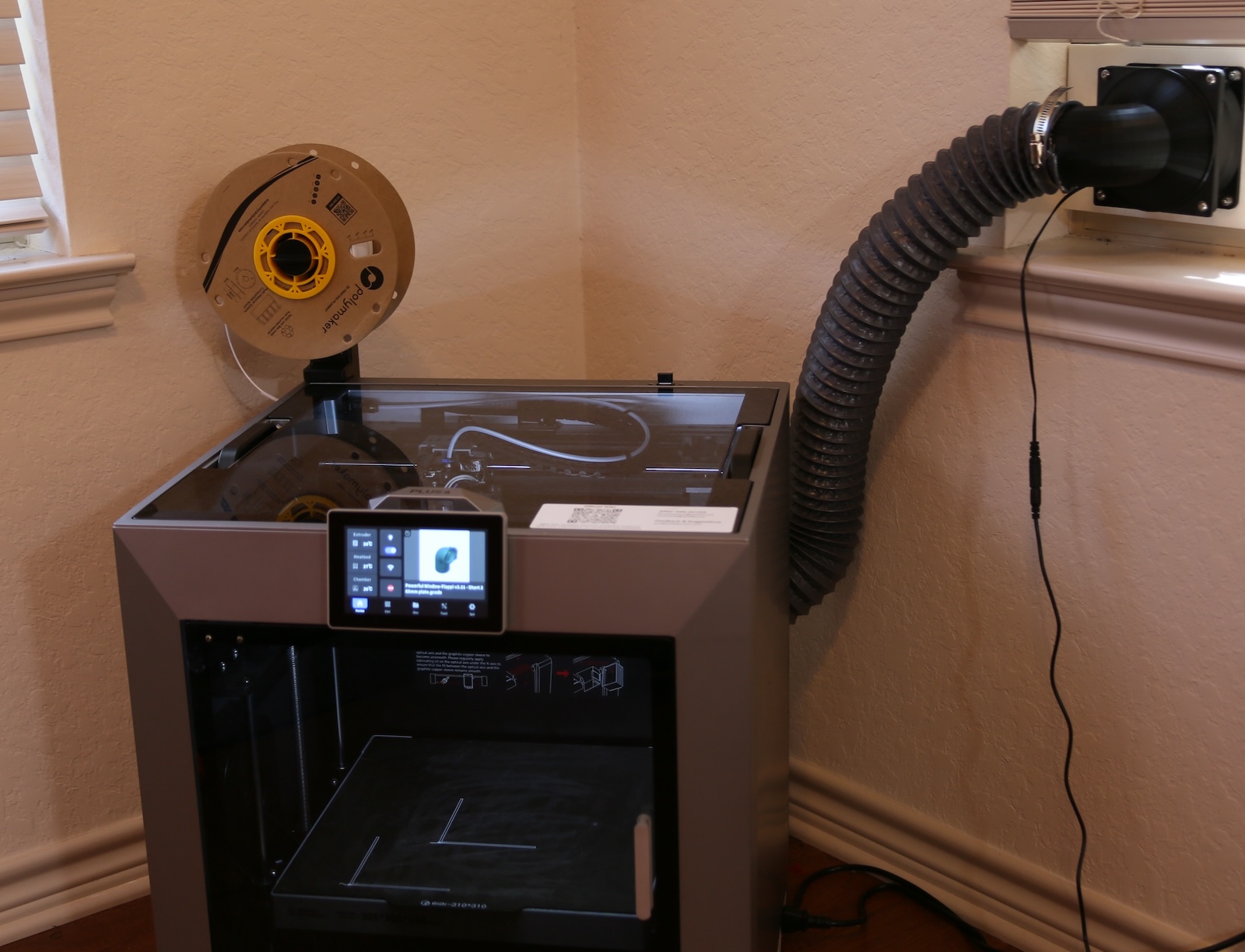
Qidi 4Plus FDM Printer

What it does not have is good wireless performance. In fact, it’s abysmal.

Despite every other device in the lab being able to receive excellent signal, the Qidi4 losses it’s connection often, and even when connected the performance is almost dial-up slow.

What do do?

Interestingly enough, the WiFi on the 4Plus is implemented with a WiFi dongle plugged directly into a USB port on the motherboard (I’ll look for a suitable photo later ). This is the dongle that is in use:


Qidid Support has told several people that upgrading the dongle is the way to solve this (why don’t they provide a better one of they know this is an issue?? hmmm). Supposedly, the one they suggest is the TP-Link AC600 Nano.

I’ve gone ahead and ordere one, but in the mean time I thought it would be interesting to see if something can be done in the mean time, for “free”.

What I tried:

I unplugged the original dongle from the printer’s motherboard, located in the top USB slot, then relocated it to the external USB port on top of the enclosure. That port is used for firmare updates, file transfers, log dumps etc. But, in theory it should work the say way as the other USB port on the motherboard. The though was, if you move the dongle outside of the enclosure to the top of the printer, it could improve the signal!

Preliminary Results:

Well, it worked.
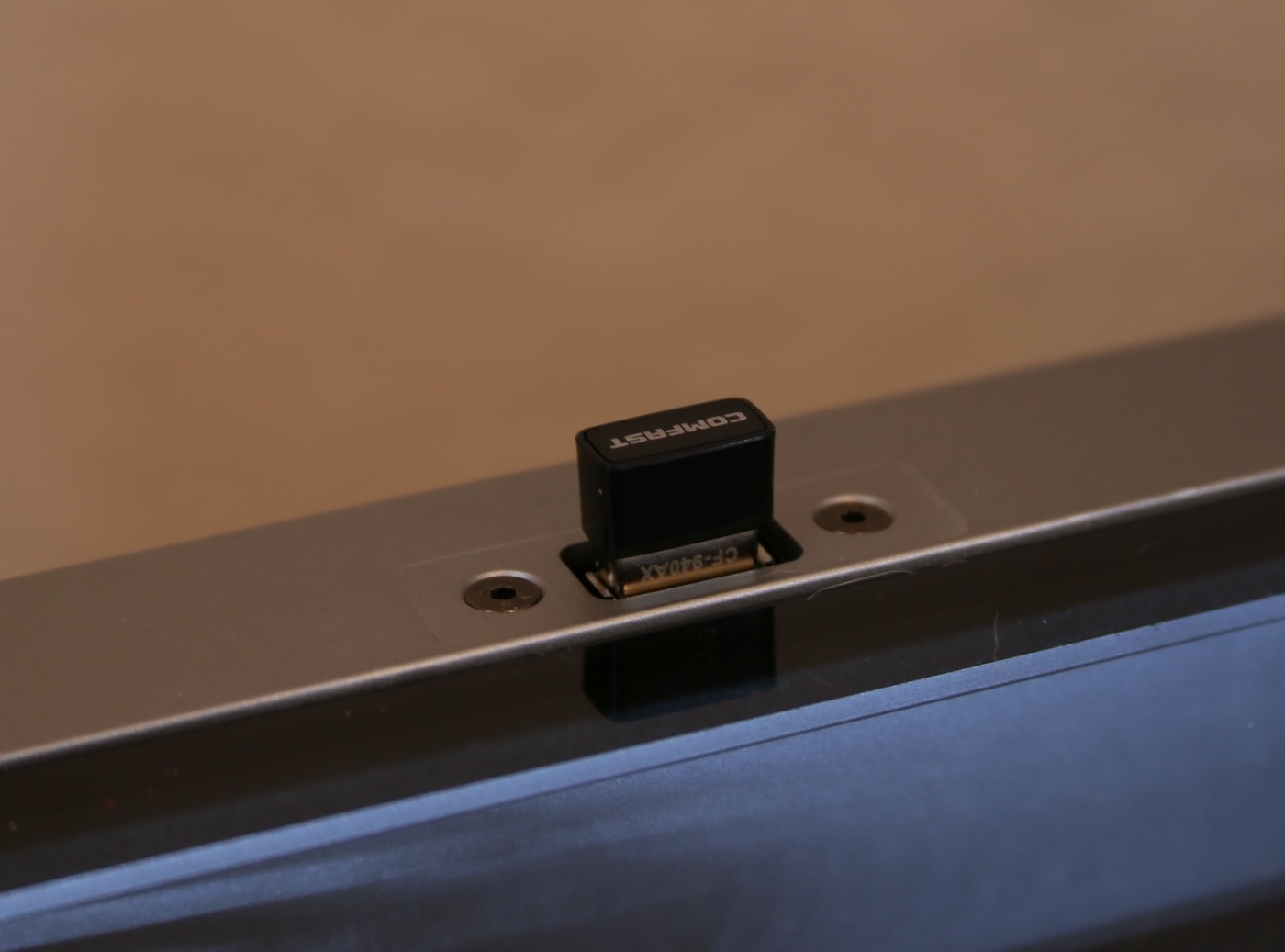
Qidi 4Plus Printer WiFi Dongle

There are no issues using the external USB port for the factory provided USB dongle. This is great news, at least it’s no longer inside subject to interference from the metal fram or other possible electronic noise.

Checking the signal strength.

Unfortunatly, I did not check the signal stregnth with the dongle inside the encloser before moving it to the external port. I might do that later, but for now, before my TP-Link AC600 arrives, I want to see what sort of WiFi signal performance I’m seeing.

First, I logged into the printer with SSH. If you’re not sure how to do that, DDG search is your friend. Once logged in, I ran ifconfig to see the device name of my wifi.

sudo ifconfig

eth0: flags=4099 mtu 1500

wlan0: flags=4163 mtu 1500
inet 172.31.11.198 netmask 255.255.255.0 broadcast 172.31.11.255
….

wlan0 is the device I want to check. Next, using the iw command, the device metrics can be seen. The number I’m most interested in is the signal, in this case -61 dbm which is… not very good.

sudo iw dev wlan0 link


Connected to 4e:65:7f:68:eb:a5 (on wlan0)
SSID: Lab
freq: 2412
signal: -61 dBm
rx bitrate: 8.6 MBit/s
tx bitrate: 11.0 MBit/s

Once I get the AC600, I’ll verify that it connects as expected, then check signal and run some transfer tests.

STRATUX ADS-B Receiver – open ports inventory

While working on a service to read data published by the STRATUX open source ADS-B receiver, it became a big of a guessing game regarding which ports where open and what protocol they might support.

In the event others are interested, there is the the port inventory from a STRATUX v1.6r1 device built on 03-MAR-2021

PortProtocolServiceAnalysis
80tcphttp Golang net/http server AngularJS web interfae
8080tcphttp-proxy says Dump1090 but always returns 404 error
9977tcphttpJson Pi System Info – temp, memory, etc.
30001tcppago-services ?-TBD-
30002tcppago-services ?appears to be a string of hashstrings (e.g.: *8DAB1D28990C37BB78042B8E5676; )
30003tcpbasestationannounced as “ADS-B flight data”
30004tcplistenerThis is a binary “Beast” input port
30005tcpunknown-TBD- possibly some binary data stream (e.g.: ‘JXf#<' )
30006tcpADS JsonJson of partial ADS-B data – always seems to be missing loation and speed info
example:
{
  "Icao_addr": 11403422,
  "DF": 17,
  "CA": 5,
  "TypeCode": 4,
  "SubtypeCode": 6,
  "SBS_MsgType": 1,
  "SignalLevel": 0.000344,
  "Tail": "LEXUS05 ",
  "Squawk": null,
  "Emitter_category": 6,
  "OnGround": false,
  "Lat": null,
  "Lng": null,
  "Position_valid": false,
  "NACp": null,
  "Alt": null,
  "AltIsGNSS": false,
  "GnssDiffFromBaroAlt": null,
  "Vvel": null,
  "Speed_valid": false,
  "Speed": null,
  "Track": null,
  "Timestamp": "2021-03-05T17:16:47.203Z"
}
30104tcpunknown -TBD- possibly raw dump1090 data stream

Diving into the Port Data


Port 30002

Text stream of data, available via a tcp connection. Each message is a hash of some sort, value of which is undetermined at this point.

Here is an example of the message stream

*5DA8C3EA379B4F;
*02E195B70936B4;
*5DA21603EB2A06;
*02C60BB129C2D0;
*02C60BB129C2D0;
*8DAD21C1592DD7EF9896504E8E50;
*02E19718EEFD09;
*8DA1B52B596233C53D9901456D9D;
*8DA216035913378FE2327C198F8A;
*8DA2160399104987B8340BFCE929;
*8DA9942E585F100DBA20C5712D44;
*8DA9942E9908212C509814A6DF7A;

Port 30003

Text stream of data, available via a tcp connection. Each message is comma delimited, and appears to the the ICAO integer converted to Base16 hex.

Here is an example of the message stream

MSG,3,111,11111,A4AB64,111111,2021/03/06,17:16:35.554,2021/03/06,17:16:35.573,,8900,,,30.41666,-98.63536,,,,,,0 MSG,4,111,11111,A4AB64,111111,2021/03/06,17:16:35.554,2021/03/06,17:16:35.574,,,159,93,,,-448,,,,,0 MSG,3,111,11111,A313BF,111111,2021/03/06,17:16:35.587,2021/03/06,17:16:35.626,,36000,,,29.68039,-98.32875,,,,,,0 MSG,7,111,11111,A8DB58,111111,2021/03/06,17:16:35.602,2021/03/06,17:16:35.627,,5900,,,,,,,,,,0 MSG,3,111,11111,A2A18A,111111,2021/03/06,17:16:35.607,2021/03/06,17:16:35.627,,5625,,,29.66141,-98.47789,,,,,,0 MSG,4,111,11111,A2A18A,111111,2021/03/06,17:16:35.607,2021/03/06,17:16:35.628,,,221,248,,,128,,,,,0 MSG,7,111,11111,A8DB58,111111,2021/03/06,17:16:35.608,2021/03/06,17:16:35.628,,5900,,,,,,,,,,0 MSG,3,111,11111,A417D6,111111,2021/03/06,17:16:35.609,2021/03/06,17:16:35.628,,24000,,,30.09300,-97.62418,,,,,,0

Port 30005

Binary stream of data, available via a tcp connection.

Here is an example of the message stream

y# ??2??)k?????3]?Sx?l3??.?@?????B?xf~3??.??yRX??L?ma??3??/?8 q?!I????3??1Q???? Z?O??3??69???+(X??????-N2??6??”ᕸ?eP3??7??#??o???,???3??;W#??o#?t?l??Zg3??>?&???Y}?o? ???I3??C k??+(???P,2N?3??D????yR? ??-3?3??F,???Y??x?_??2??F6? ?8\`3??Hg???+?ȱ?/?2??I????p2??Ke`#ᕸ?eP2??P?]?+(??A2??U^ ?8\`2??Un<ᕸ???3??XWW???.X?????_?3??X????Y???{?+3??X?h%??o?B?`_?_b?2??Z?f???~?2??Z?j??p2??]- ??|+?3??_e? ??SxX??56S?J?3??_?????.@ ???2??`????2??e?F%]?o7C?3??jt??Sx?y%?`2??l/???? 3??n??????? ??-??3??q?U q? ?-0?Jc3??q?)???Y??)? T??2????7?8?}?2???γ 8إ?2????H ?FU3????|????Y??1??2???L?]?\g??2????E]??.???3??|?{??????>?0 2????]?\g??3????????!;

Port 30006

High volume text stream, available via tcp connection. Messages are in a Json format. Observation is that these always seem to lack geo-location, speed and altitude data.

Here is an example of the message stream

{“Icao_addr”:10627880,”DF”:11,”CA”:5,”TypeCode”:0,”SubtypeCode”:0,”SBS_MsgType”:8,”SignalLevel”:0.000816,”Tail”:null,”Squawk”:null,”Emitter_category”:null,”OnGround”:false,”Lat”:null,”Lng”:null,”Position_valid”:false,”NACp”:null,”Alt”:null,”AltIsGNSS”:false,”GnssDiffFromBaroAlt”:null,”Vvel”:null,”Speed_valid”:false,”Speed”:null,”Track”:null,”Timestamp”:”2021-03-06T17:34:12.129Z”} {“Icao_addr”:10645249,”DF”:11,”CA”:5,”TypeCode”:0,”SubtypeCode”:0,”SBS_MsgType”:8,”SignalLevel”:0.000846,”Tail”:null,”Squawk”:null,”Emitter_category”:null,”OnGround”:false,”Lat”:null,”Lng”:null,”Position_valid”:false,”NACp”:null,”Alt”:null,”AltIsGNSS”:false,”GnssDiffFromBaroAlt”:null,”Vvel”:null,”Speed_valid”:false,”Speed”:null,”Track”:null,”Timestamp”:”2021-03-06T17:34:12.139Z”} {“Icao_addr”:11402414,”DF”:4,”CA”:0,”TypeCode”:0,”SubtypeCode”:0,”SBS_MsgType”:5,”SignalLevel”:0.001636,”Tail”:null,”Squawk”:null,”Emitter_category”:null,”OnGround”:false,”Lat”:null,”Lng”:null,”Position_valid”:false,”NACp”:null,”Alt”:6075,”AltIsGNSS”:false,”GnssDiffFromBaroAlt”:null,”Vvel”:null,”Speed_valid”:false,”Speed”:null,”Track”:null,”Timestamp”:”2021-03-06T17:34:12.142Z”} {“Icao_addr”:10645249,”DF”:11,”CA”:5,”TypeCode”:28,”SubtypeCode”:1,”SBS_MsgType”:8,”SignalLevel”:0.000837,”Tail”:null,”Squawk”:null,”Emitter_category”:null,”OnGround”:false,”Lat”:null,”Lng”:null,”Position_valid”:false,”NACp”:null,”Alt”:null,”AltIsGNSS”:false,”GnssDiffFromBaroAlt”:null,”Vvel”:null,”Speed_valid”:false,”Speed”:null,”Track”:null,”Timestamp”:”2021-03-06T17:34:12.158Z”}

Stratux – handling a full filesystem

Running a Stratux in test-bench mode (not in an aircraft, and for days at a time), you’ll likely run into an issue with disk space. The ISO image I acquired from Stratux only provided a 1.8 BG partition for things to live in, and it’s quickly exhausted.

Here is the status of my system after running for about 36 hours… it’s full.

Filesystem Size Used Avail Use% Mounted on
/dev/root 1.8G 1.8G 0 100% /
devtmpfs 459M 0 459M 0% /dev
tmpfs 463M 0 463M 0% /dev/shm
tmpfs 463M 30M 434M 7% /run
tmpfs 5.0M 4.0K 5.0M 1% /run/lock
tmpfs 463M 0 463M 0% /sys/fs/cgroup
/dev/mmcblk0p1 60M 20M 41M 34% /boot

Now to get about the business of increasing the partition and filesystem size without destroying it. First

Locate the disk device

Instructions on the web are not exactly correct, some suggest /dev/sda as the main device, however my testing shows it’s actually this named ‘/dev/mmcblk0’.


root@raspberrypi:~# fdisk -l | grep Disk
[...]
Disk /dev/mmcblk0: 14.5 GiB, 15523119104 bytes, 30318592 sectors

… with the following partitions:

Device Boot Start End Sectors Size Id Type
/dev/mmcblk0p1 8192 131071 122880 60M c W95 FAT32 (LBA)
/dev/mmcblk0p2 131072 3887103 3756032 1.8G 83 Linux
Running fdisk

With the physical partition located.. start fdisk:


fdisk /dev/mmcblk0

Welcome to fdisk (util-linux 2.25.2).
Changes will remain in memory only, until you decide to write them.
Be careful before using the write command.

I ended up creating 3 primary partitions. The plan is to delete partition 3 and then re-size the main partition to use up remaining space:


Device Boot Start End Sectors Size Id Type
/dev/mmcblk0p1 8192 131071 122880 60M c W95 FAT32 (LBA)
/dev/mmcblk0p2 131072 3887103 3756032 1.8G 83 Linux
/dev/mmcblk0p3 2048 8191 6144 3M 5 Extended
/dev/mmcblk0p4 3887104 20664319 16777216 8G 83 Linux

Command (m for help): d
Partition number (1-5, default 5): 3

Partition 3 has been deleted.

Device Boot Start End Sectors Size Id Type
/dev/mmcblk0p1 8192 131071 122880 60M c W95 FAT32 (LBA)
/dev/mmcblk0p2 131072 3887103 3756032 1.8G 83 Linux
/dev/mmcblk0p4 3887104 20664319 16777216 8G 83 Linux

Write out the partition and… then run to enable it:


Command (m for help): w
The partition table has been altered.
Calling ioctl() to re-read partition table.

partprobe

Next, put a filesystem on this new partition. Using df to determine the type of filesystem currently in use; I recommend that you stick with it for this most basic of operations:


df -T

Filesystem Type 1K-blocks Used Available Use% Mounted on
/dev/root ext4 1815440 1799056 0 100% /

Run mkfs


/sbin/mkfs -t ext4 /dev/mmcblk0p4

Creating filesystem with 2097152 4k blocks and 524288 inodes
Filesystem UUID: e36a8f6c-a457-4531-b67d-bea4885a9583
Superblock backups stored on blocks:
32768, 98304, 163840, 229376, 294912, 819200, 884736, 1605632

Allocating group tables: done
Writing inode tables: done
Creating journal (32768 blocks): done
Writing superblocks and filesystem accounting information:... this might go on for a bit..

Once completed.. mount this where the logs and databases live. To do this the first thing that needs to happen is to check your current fstab:


cat /etc/fstab
proc /proc proc defaults 0 0
/dev/mmcblk0p1 /boot vfat defaults 0 2
/dev/mmcblk0p2 / ext4 defaults,noatime 0 1
# a swapfile is not a swap partition, no line here
# use dphys-swapfile swap[on|off] for that

My first order of business was to mount the new filesystem to a temporary location (/var/log2) and then copy the contents of /var/log to that location, then delete everything in the log directory, and then unmount log2.


/var/log2

mount -t ext4 /dev/mmcblk0p4 /var/logs

cp -R log/* log2/.

cd log
rm -rf *

umount /dev/mmcblk0p4

Edit the fstab file to create a mount point for the new partition where the logs used to be written (added the orange line), and ran mount to verify that it will automount on a restart.


vi /etc/fstab

proc /proc proc defaults 0 0
/dev/mmcblk0p1 /boot vfat defaults 0 2
/dev/mmcblk0p2 / ext4 defaults,noatime 0 1
/dev/mmcblk0p4 /var/log ext4 defaults,noatime 0 0

mount -a

df

Filesystem 1K-blocks Used Available Use% Mounted on
/dev/root 1815440 1768992 0 100% /
devtmpfs 469688 0 469688 0% /dev
tmpfs 474004 0 474004 0% /dev/shm
tmpfs 474004 35972 438032 8% /run
tmpfs 5120 4 5116 1% /run/lock
tmpfs 474004 0 474004 0% /sys/fs/cgroup
/dev/mmcblk0p1 61384 20400 40984 34% /boot
/dev/mmcblk0p4 8125880 333800 7356268 5% /var/log

Restart and verify

Restart the little box and verify that the mount was preserved.


init 6

Log back in, and run df to check the filesystem health. It should now has the the main filesystem has some breathing room again:

                                                                                              
 ad88888ba  888888888888  88888888ba          db    888888888888  88        88  8b        d8  
d8"     "8b      88       88      "8b        d88b        88       88        88   Y8,    ,8P   
Y8,              88       88      ,8P       d8'`8b       88       88        88    `8b  d8'    
`Y8aaaaa,        88       88aaaaaa8P'      d8'  `8b      88       88        88      Y88P      
  `"""""8b,      88       88""""88'       d8YaaaaY8b     88       88        88      d88b      
        `8b      88       88    `8b      d8""""""""8b    88       88        88    ,8P  Y8,    
Y8a     a8P      88       88     `8b    d8'        `8b   88       Y8a.    .a8P   d8'    `8b   
 "Y88888P"       88       88      `8b  d8'          `8b  88        `"Y8888Y"'   8P        Y8  

NOTE TO DEVELOPERS: Make sure that your system has an acceptable clock source, i.e., a GPS
with sufficient signal or enable ntpd (internet connection required).

Everything here comes with ABSOLUTELY NO WARRANTY, to the extent
permitted by applicable law.

Type 'stratux-help' (as root) for a few debugging commands.
pi@raspberrypi:~ $ df

Filesystem 1K-blocks Used Available Use% Mounted on
/dev/root 1815440 1389856 332592 81% /
devtmpfs 469688 0 469688 0% /dev
tmpfs 474004 0 474004 0% /dev/shm
tmpfs 474004 6336 467668 2% /run
tmpfs 5120 16 5104 1% /run/lock
tmpfs 474004 0 474004 0% /sys/fs/cgroup
/dev/mmcblk0p4 8125880 329820 7360248 5% /var/log
/dev/mmcblk0p1 61384 20400 40984 34% /boot

At a later date I’ll work on expanding the main partition, but for now this should stabilize the machine and resolve the main disk consumption issue.